
What's New in TX Text Control ActiveX 31.0
Signature fields, built-in dialog boxes for opening and saving documents and a dialog box for form fields are the additions of TX Text Control ActiveX 31.0 over version 30.0. The sections below list the new features, the new members of TXTextControl and the existing members that version 31.0 extended.
Version 31.0 was released on September 7, 2022, together with TX Text Control .NET Server, TX Text Control .NET for Windows Forms, TX Text Control .NET for WPF and TX Spell .NET 10.0.
New Features
- Signature fields. TX Text Control now supports signature fields, which can be associated with a digital certificate.
- Position. Like an image or a text frame, a signature field is positioned either geometrically or as a single character. A geometric position is relative to the paragraph the field is anchored to or relative to the complete document. SignatureFieldInsert, SignatureFieldInsertAsChar and SignatureFieldInsertFixed insert a signature field in a document.
- Signature image. A signature field is the site of a signature image. You add the image with the ImageFilename property, either when the document is designed or later, when it is digitally signed.
- Certificates. When the document is saved as a PDF document, the txSignatureFields setting of the LoadSaveAttribute property associates each signature field with a digital certificate. To be associated with a certificate, a signature field must have a name, which you specify with the ObjectName property.
- Signer data. A signature field also stores data of a suggested signer, set with the SignatureFieldSignerData property.
- Find and select. ObjectNext with the ObjectGroup parameter set to &H400 returns all signature fields of a document. ObjectGetSelected with the same parameter value checks whether a signature field is selected.
- Dialog box. ObjectAttrDialog opens a dialog box with layout settings such as position, size and text distances, and with image saving options when a signature image exists.
- File formats. Signature fields are saved in the TX Text Control format and in PDF. All other formats save the signature image.
- Other members. All other properties, methods and events for objects and images, such as ObjectDelete, ImageExportFormat and ObjectClicked, work with signature fields as well. Images, Text Frames, Signature Fields and OLE Objects lists them.
- Built-in dialog boxes.
TXTextControlnow has built-in dialog boxes for opening and saving documents, which the new LoadDialog and SaveDialog methods display. Their parameters specify filters for the available file formats and additional saving options. The txDocFileName and txDocFileFormat attributes of the LoadSaveAttribute property return the file name and the format the user selected. The txDefaultFileFormat attribute determines the filter that is selected when the dialog box opens. - Form fields.
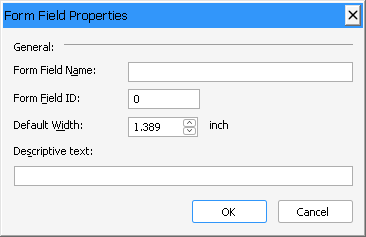
TXTextControlsupports several types of form fields. The new FormFieldDialog method opens a built-in dialog box that manages the default settings of a specific form field.
New Properties, Methods and Events
Version 31.0 adds one property and six methods to TXTextControl.
Properties
| Member | Description |
|---|---|
| TXTextControl.SignatureFieldSignerData | Defines information about a suggested signer. |
Methods
| Member | Description |
|---|---|
| TXTextControl.FormFieldDialog | Opens a built-in dialog box to set formatting attributes for the specified form field. |
| TXTextControl.LoadDialog | Opens the system Open dialog box and loads a document as specified. |
| TXTextControl.SaveDialog | Opens the system Save As dialog box and saves a document as specified. |
| TXTextControl.SignatureFieldInsert | Inserts a new signature field anchored to a paragraph. |
| TXTextControl.SignatureFieldInsertAsChar | Inserts a new signature field, which is then handled as a single character in the text. |
| TXTextControl.SignatureFieldInsertFixed | Inserts a new signature field at a fixed geometrical position. |
Extended Properties, Methods and Events
| Member | Change |
|---|---|
| LoadSaveAttribute property | Extended with the txDocFileName and txDocFileFormat attributes, which return the file name and format the user selected when a document has been loaded or saved with a built-in dialog box. The txDefaultFileFormat attribute determines the filter that is selected when the dialog box opens. |
| LoadSaveAttribute property | Extended with the txSignatureFields attribute, which digitally signs PDF documents with certificates associated with signature fields. |
| ObjectDelete method | Extended to support signature fields. All other properties, methods and events whose names start with Object... and Image... have been extended in the same way. Images, Text Frames, Signature Fields and OLE Objects lists them. |