
Working With Files
TX Text Control works with eight file formats, from its own native format for document files to RTF, HTML, XML, Word and plain text, and it exports PDF. Which one you choose decides what else can go into the file: the exchange formats hold the contents of one TXTextControl, while the native format can carry a file header or the contents of several controls.
Supported File Formats
| Format | Used for |
|---|---|
| Native TX Text Control format | Storing data in document files, the format you normally use |
| Rich Text Format (RTF) | Exchanging formatted text with other applications |
| HTML | Loading and saving HTML documents |
| XML | Loading and saving XML documents |
| Microsoft Word (.docx) | Loading and saving Word documents |
| Microsoft Word 97-2003 (.doc) | Loading and saving Word 97-2003 documents |
| Unformatted text | Text in ANSI or Unicode format |
| Adobe PDF | Exporting documents only |
Load and Save a Format
To use RTF, HTML, Word or unformatted text, pass the format you want as a parameter of the Load or Save method. The reference pages of both methods list the format identifiers.
With RTF, HTML, Word and unformatted text, a file holds the contents of a single TXTextControl: you read them from the file or write them to it, and nothing else.
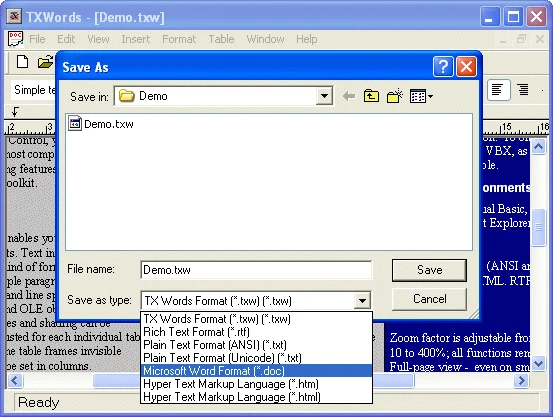
In the TXWords sample, the user chooses the format in the Save as type list of the Save As dialog box:
Combine Data in One File
The native file format goes further:
- A file header. You can write a header of your own to the file before you save the
TXTextControldata. - Several controls. You can write the contents of several
TXTextControlcontrols to one file.
Next Steps
- Mail Merge: the sample program writes the contents of
TXTextControland other data to a single file. - A Word Processor: the TXWords sample writes a file header before the
TXTextControldata and uses RTF, HTML, Word and unformatted text. - File Drag and Drop: loading a file that the user drops on the control.
- PDF Export: creating PDF documents.