
What's New in TX Text Control ActiveX 29.0
Tables of contents, generated from the structure levels of the paragraphs, are the main addition of TX Text Control ActiveX 29.0 over version 28.0. The version also moved the control to a newer Microsoft Foundation Classes library. Its new features, methods and events follow.
New Features
- MFC version. The Microsoft Foundation Classes library has been updated from version 9.0 to version 12.0 (MFC120U.DLL).
- Tables of contents. A table of contents is generated automatically from the structure level of each paragraph in the document.
- Structure levels. The dialog box for paragraph attributes has been extended to specify a structure level from 0 to 10. A structure level of 0 means that the paragraph belongs to the body of the document. You can set a level for each paragraph, but it is more common to make it an attribute of a paragraph style.
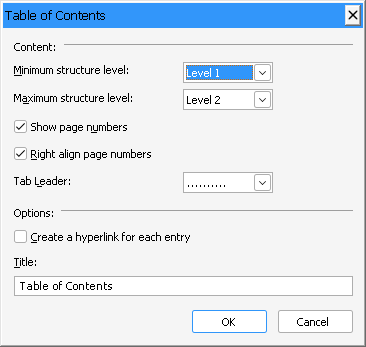
- Insert a table of contents. TableOfContentsDialog offers the end user a dialog box to set all necessary parameters. TX Text Control then searches the document for all paragraphs with the specified structure levels, generates the table of contents with or without page numbers and adds it at the current text input position.
- Formatting. The table of contents takes the font and paragraph attributes of the paragraphs it contains. For each level, a formatting style is generated, so that the end user can change these attributes: TOC_Title, TOC_Level1, TOC_Level2 and so on.
- Properties. In TableOfContentsDialog, you define the properties of a table of contents. The most important are the minimum and the maximum structure level of the paragraphs it contains; others are a title and whether page numbers are included. A document can contain several tables of contents built from paragraphs of different levels.
- Links. Links can be generated automatically. Each entry of the table of contents is then a text field of the FieldType txFieldInternalLink with a corresponding link target. When the end user clicks an entry while pressing the CTRL key, the document scrolls to the corresponding page.
- Events. Events occur when a table of contents is created (TableOfContentsCreated), deleted (TableOfContentsDeleted), entered (TableOfContentsEntered) or left (TableOfContentsLeft).
New Properties, Methods and Events
Version 29.0 adds three methods and four events to TXTextControl, all for tables of contents.
Methods
| Member | Description |
|---|---|
| TXTextControl.TableOfContentsDelete | Deletes a table of contents. |
| TXTextControl.TableOfContentsDialog | Invokes the built-in dialog box for inserting or changing a table of contents. |
| TXTextControl.TableOfContentsUpdate | Updates the content and the page numbers of a table of contents. |
Events
| Member | Description |
|---|---|
| TXTextControl.TableOfContentsCreated | Occurs when a table of contents has been created. |
| TXTextControl.TableOfContentsDeleted | Occurs when a table of contents has been deleted. |
| TXTextControl.TableOfContentsEntered | Occurs when the current text input position has been moved to a position that belongs to a table of contents. |
| TXTextControl.TableOfContentsLeft | Occurs when the current text input position has left a table of contents. |