
Tables of Contents
How does TXTextControl know which paragraphs belong in a table of contents? Each paragraph has a structure level: 0 for body text, 1 to 10 for headings of different depth. A table of contents lists the paragraphs of the levels you choose, optionally with page numbers and links to the headings, and TX Text Control generates it for you. Tables of contents are available since version 29.0.
Users insert and change a table of contents in a built-in dialog box; your Visual Basic 6 code opens the dialog box, updates and deletes tables of contents and follows the text input position in and out of them. The samples come from the TXWords sample program, which A Word Processor describes.
How a Table of Contents Is Generated
A table of contents is built from three things:
- Structure levels. The built-in paragraph dialog box, which the ParagraphDialog method opens, sets the structure level of the selected paragraphs, from 0 to 10. A level can be set for each paragraph, but it is more common to make it an attribute of a paragraph style, so that every heading of one style has the same level. Stylesheets describes styles and the style dialog box.
- The attributes of the table of contents. In the dialog box that TableOfContentsDialog opens, the user chooses the lowest and the highest structure level that the table of contents includes, a title and whether it shows page numbers.
- The paragraphs of the document. TX Text Control searches the document for all paragraphs with the chosen structure levels and inserts the table of contents at the text input position, the place of the caret.
The entries take the font and paragraph attributes of the paragraphs they come from. For each level, TX Text Control also creates a formatting style, named TOC_Title, TOC_Level1, TOC_Level2 and so on, so that users change the look of the table of contents by changing these styles.
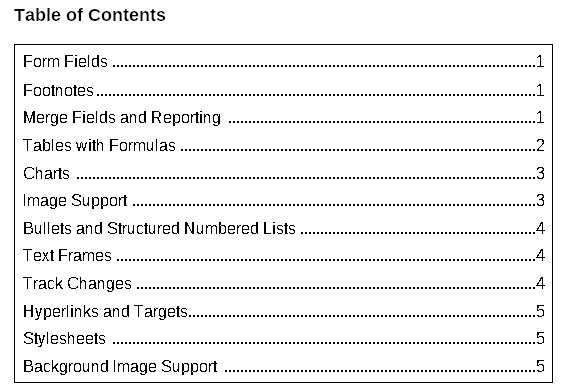
Links from the entries to the headings can be generated automatically. Each entry is then a marked text field of the FieldType txFieldInternalLink that points to a link target at its heading. When the user clicks an entry while pressing the CTRL key, the document scrolls to the page of the heading. Hypertext Links describes internal links.
A document can contain several tables of contents, each built from paragraphs of different structure levels.
Insert a Table of Contents
TableOfContentsDialog opens the built-in dialog box. When the text input position isn't in a table of contents, the method inserts a new one with the attributes the user sets:
Dim TOCId As Long
TOCId = TXTextControl1.TableOfContentsDialog
If TOCId = 0 Then
   MsgBox "No table of contents was inserted."
End If
The code works as follows:
TableOfContentsDialogreturns the unique identifier of the inserted table of contents, a Long value that the other methods take as their parameter.- It returns 0 when the user left the dialog box with Cancel, or when the table of contents would be empty because the document has no paragraph with the chosen structure levels.
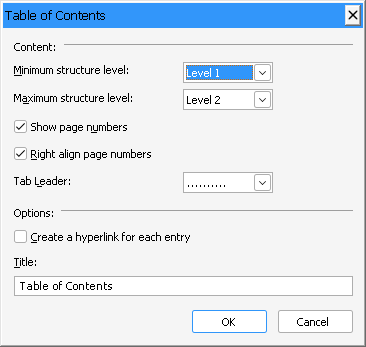
In TXWords, Insert > Table of Contents... calls the method without evaluating the return value. TXWords enables the menu item only when the text input position isn't in a table of contents, which it knows from the events in the next section:
Private Sub mnuInsert_TOC_Click()
    TXTextControl1.TableOfContentsDialog
End Sub
Track the Table of Contents at the Input Position
Four events report what happens to tables of contents. Each passes the identifier of the table of contents:
- TableOfContentsCreated occurs when a table of contents has been created.
- TableOfContentsDeleted occurs when one has been deleted.
- TableOfContentsEntered occurs when the text input position has moved into a table of contents.
- TableOfContentsLeft occurs when it has left one.
TXWords stores the identifier of the table of contents at the text input position in a form-level variable, CurrentTOCId, which is 0 while the text input position is elsewhere:
Dim CurrentTOCId As Long

Private Sub TXTextControl1_TableOfContentsEntered(ByVal TOCId As Long)
    CurrentTOCId = TOCId
End Sub

Private Sub TXTextControl1_TableOfContentsLeft(ByVal TOCId As Long)
    CurrentTOCId = 0
End Sub

Private Sub TXTextControl1_TableOfContentsDeleted(ByVal TOCId As Long)
    If CurrentTOCId = TOCId Then CurrentTOCId = 0
End Sub
With this variable, TXWords enables Insert > Table of Contents... only while CurrentTOCId is 0, and the Edit > Table of Contents submenu only while it isn't.
Change a Table of Contents
When the text input position is in an existing table of contents, TableOfContentsDialog shows the attributes of that table of contents instead of inserting a new one. The user changes the structure levels, the title or the page numbers, and the method returns the identifier of the changed table of contents.
The Edit > Table of Contents > Edit... menu item of TXWords is the same call as the Insert menu item:
Private Sub mnuEdit_TOC_Edit_Click()
    TXTextControl1.TableOfContentsDialog
End Sub
Update and Delete a Table of Contents
TableOfContentsUpdate brings its entries and page numbers up to date, for example after the user has added headings or the text has moved to other pages. TableOfContentsDelete removes it from the document. Both take the identifier and return False when an error occurred or the identifier is invalid.
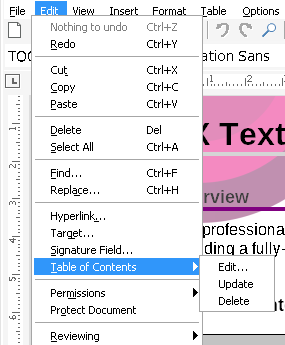
TXWords calls them from Edit > Table of Contents > Update and Delete, with the identifier of the table of contents at the text input position:
Private Sub mnuEdit_TOC_Update_Click()
    TXTextControl1.TableOfContentsUpdate CurrentTOCId
End Sub

Private Sub mnuEdit_TOC_Delete_Click()
    TXTextControl1.TableOfContentsDelete CurrentTOCId
End Sub
To update a table of contents from code without the user being in it, keep the identifier that TableOfContentsDialog returned:
If Not TXTextControl1.TableOfContentsUpdate(TOCId) Then
   MsgBox "The table of contents could not be updated."
End If
Key Members
| Member | Description |
|---|---|
| TableOfContentsDialog | Opens the built-in dialog box that inserts a table of contents or changes the one at the text input position, and returns its identifier. |
| TableOfContentsUpdate | Updates the entries and page numbers of a table of contents. |
| TableOfContentsDelete | Deletes a table of contents. |
| TableOfContentsEntered, TableOfContentsLeft | Occur when the text input position moves into or out of a table of contents. |
| TableOfContentsCreated, TableOfContentsDeleted | Occur when a table of contents has been created or deleted. |
| ParagraphDialog | Opens the paragraph dialog box, in which users set the structure level of paragraphs. |
The programming category Using a Table of Contents lists all members for tables of contents.