
Each TX Text Control product has different requirements for development and redistribution. The following articles list the system requirements for development with TX Text Control .NET Server for ASP.NET and which files need to be included for redistribution.
Supported Windows versions:
Supported Microsoft .NET Versions:
Supported Development Environments:
When deploying applications, TX Text Control fully supports the Publish functionality of Visual Studio. The NuGet packages will automatically copy the required files to the output directory. The following steps are required to publish your created project to your local file system that can be manually copied to your server. Optionally, you can directly publish your Web application to your server, a Windows Azure server or an FTP location. Refer to your Visual Studio documentation to learn how to use the Publish feature.
1. In the Solution Explorer, select the project and choose Build -> Publish Selection form the main menu.
2. Select Folder and click Next.
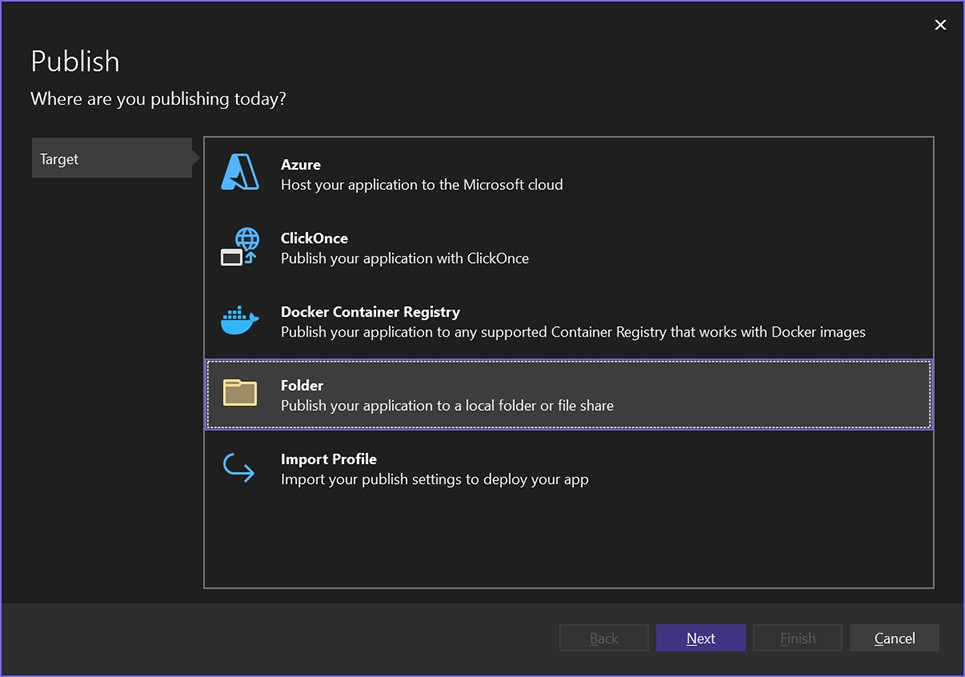
3. In the next dialog, select Folder again as the specific target and confirm with Next.
4. Select the folder location and confirm with Finish.
5. Click Show all settings to open the publish settings.
6. Select either win-x64 or linux-x64 as the Target runtime and confirm with Save.
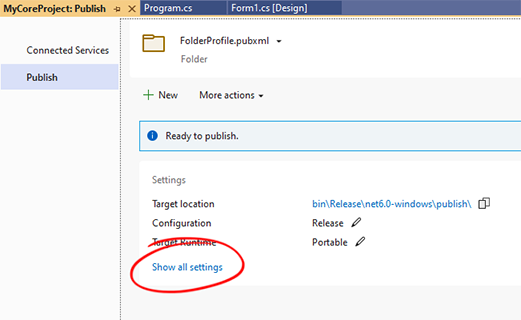
7. Click Publish to publish the application.
Supported Windows versions:
Supported Microsoft .NET Framework Versions:
Supported Development Environments:
Supported Internet Browsers:
Supported Destination Operating Systems:
Supported Windows versions:
Supported Linux distributions:
Most Linux distributions and cloud services are directly supported. The following has been tested: