
Text Control AI
TX Text Control AI connects language models with real documents in .NET applications. A model understands a request, summarizes a contract or plans a document change, and the TX Text Control engine creates, edits and exports the document itself. The preview consists of six NuGet packages and ten sample applications, designed so that models run on infrastructure you control instead of a public model service.
The packages are a preview, version 0.1.0-beta.3 at the time of writing. They're for evaluation and integration feedback, their APIs and behavior may change before the stable release, and they require appropriately licensed TX Text Control products. Overview explains where the preview fits among the other AI building blocks.
What TX Text Control AI Is
TX Text Control AI combines three capabilities that are often built separately:
- Language. A model that your application owns chats, summarizes, extracts structured information, rewrites text and plans document actions.
- Documents. The TX Text Control engine creates, inspects, modifies, formats and exports real documents.
- Reference knowledge. Passages retrieved from approved documents give answers and authorized edits their context.
The model, the integration layer and the document engine keep their responsibilities apart, as Language and Documents describes. The developer API works with IChatClient of Microsoft.Extensions.AI, and the ASP.NET Core package provides HTTP endpoints and browser libraries, while your application keeps its own pages, navigation, identity and business rules.
The Packages
| Package | Provides | Target |
|---|---|---|
TXTextControl.AI | The model, client and session API for chat, streaming and structured responses | .NET 8 |
TXTextControl.AI.LlamaServer | The native llama.cpp process, runtime installation, hardware reporting and an embedding generator; included by TXTextControl.AI | .NET 8 |
TXTextControl.AI.Mcp | An MCP client that discovers and calls the tools of the document server and downloads exported files | .NET 8 |
TXTextControl.AI.AspNetCore | HTTP endpoints for AI workflows, streaming, runtime and knowledge administration, a proxy to a remote AI service and the browser libraries client.js and editor.js | .NET 8 |
TXTextControl.AI.Knowledge | Private collections, versioned sources, indexing jobs, SQLite full-text search and optional semantic or hybrid retrieval | .NET 8 |
TXTextControl.AI.McpServer | A hosting library that exposes TX Text Control document operations through the Model Context Protocol (MCP) | .NET 10 |
All six packages are published on nuget.org. TXTextControl.AI.McpServer depends on TXTextControl.TextControl.Core.SDK, which comes from the Text Control Private NuGet Feed. No package contains model weights, the native llama-server executable, GPU drivers, an administration page or a TX Text Control license key.
How the Parts Work Together
Browser
  -> Web application (pages, styling, Document Editor, identity)
       -> AI integration in the web application, or a proxy to a separate AI service
            -> llama-server inference runtime with GGUF models
            -> knowledge store with optional embedding process
            -> MCP document server (Windows or Linux)
| Component | Responsibility |
|---|---|
| Web application | Pages, sign-in, the Document Editor and an optional proxy to the AI service |
| Integration host | Chat history, the loaded model, runtime administration, exported files and optional knowledge |
llama-server | Inference, as a process owned by the integration host or as an explicitly trusted external endpoint |
| MCP document server | Creating, editing, converting and extracting documents with TX Text Control; a separately licensed host on Windows or Linux |
The blog article that introduces the preview shows the packages in the three places where they run: the web application, the AI host and the document host:
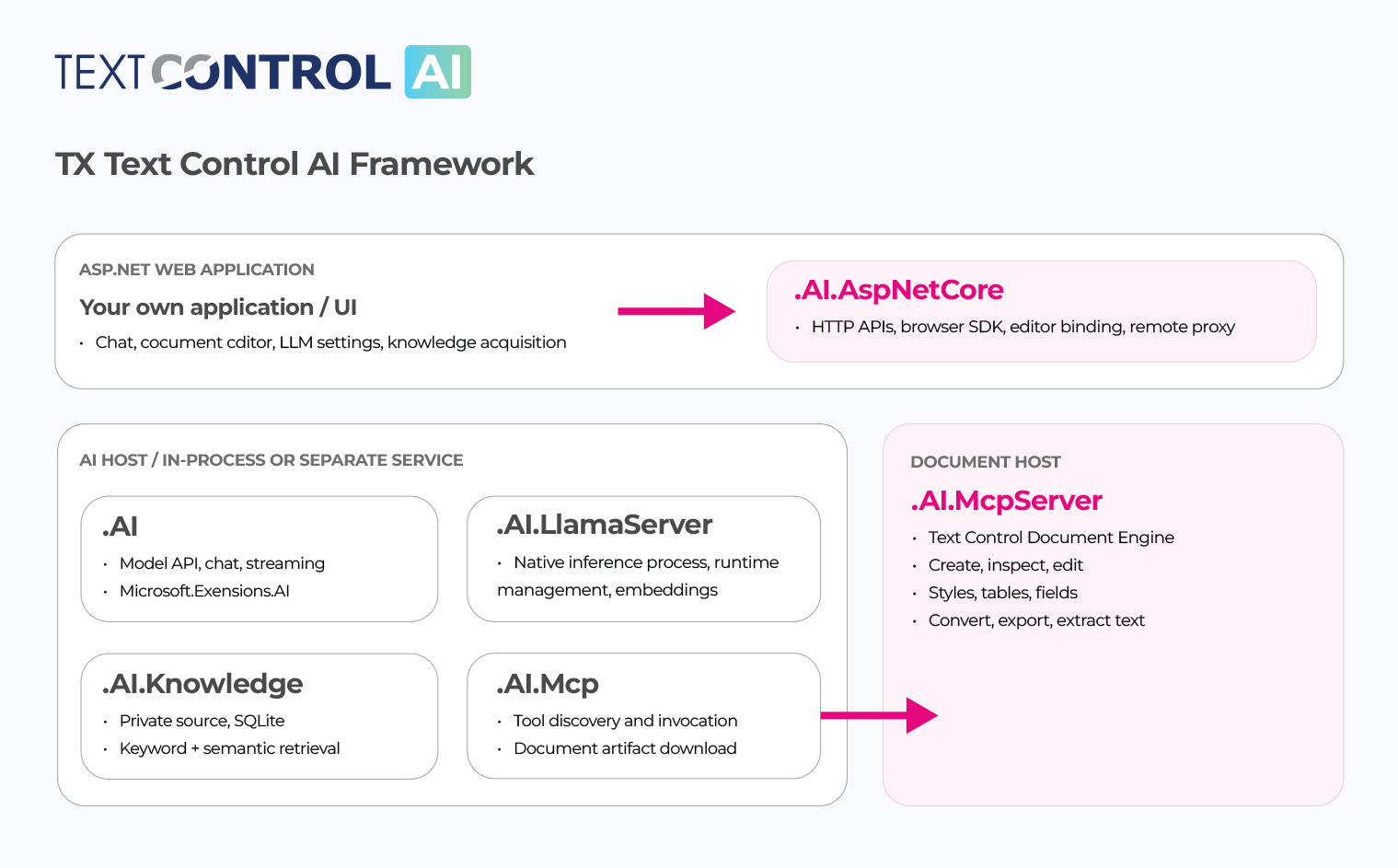
In the simplest setup, the integration host is the web application itself. For shared GPU hardware, the integration runs in a separate AI service, and the web application forwards its requests. The MCP document server always runs as its own host, because it's the part that needs the TX Text Control document engine.
Requirements
- .NET. The .NET 10 SDK builds the sample collection, and the .NET 8 and ASP.NET Core 8 runtimes run the AI applications. The MCP document server samples target .NET 10.
- Package sources. The AI packages come from nuget.org; the TX Text Control packages, such as
TXTextControl.TextControl.Core.SDKand the Document Editor packages, come from the Text Control Private NuGet Feed. A restore error from that feed is solved by configuring authorized feed access, not by any model setting. - Licenses. Appropriately licensed TX Text Control products are required. The packages and samples use the Text Control AI Source Available License 1.0, which isn't an unrestricted open-source license, and model weights, inference engines and other dependencies keep their own licenses.
- Runtime and model. You provide an appropriately licensed GGUF chat model and a compatible llama.cpp runtime, as Local / Private LLMs describes. Restoring packages or starting an application doesn't download a model.
- Platforms. The document engine and the Document Editor host run on Windows or Linux. A separate AI service can run on macOS with a compatible native inference runtime.
Run the Samples
The samples are in the GitHub repository txtextcontrol-ai-samples, which contains application source only and uses the packages from NuGet. Clone and build the collection:
git clone https://github.com/TextControl/txtextcontrol-ai-samples.git
cd txtextcontrol-ai-samples
dotnet restore TXTextControl.AI.Samples.sln
dotnet build TXTextControl.AI.Samples.sln Release
The complete web application, WebDocumentAssistant, needs the MCP document server. Start them in this order:
Start the MCP document server. Store an administrator user name and password with
dotnet user-secretsfor thesamples/McpServerproject, then rundotnet run --project samples/McpServer. Its MCP endpoint ishttp://127.0.0.1:5000/mcp.Provide a model. Copy a GGUF chat model into samples/WebDocumentAssistant/Models, or set
LocalAI:ModelDirectoryto the folder with your models.Start the web application with
dotnet run --project samples/WebDocumentAssistantand openhttp://localhost:5187.Load the model. On the Runtime tab, leave the AI service URL empty, install a runtime or set
LocalAI:LlamaServerExecutablePath, test the MCP endpoint, select the chat model and load it. The sample configures a context of 65,536 tokens; for a first test of a compact model, start with 8,192 tokens.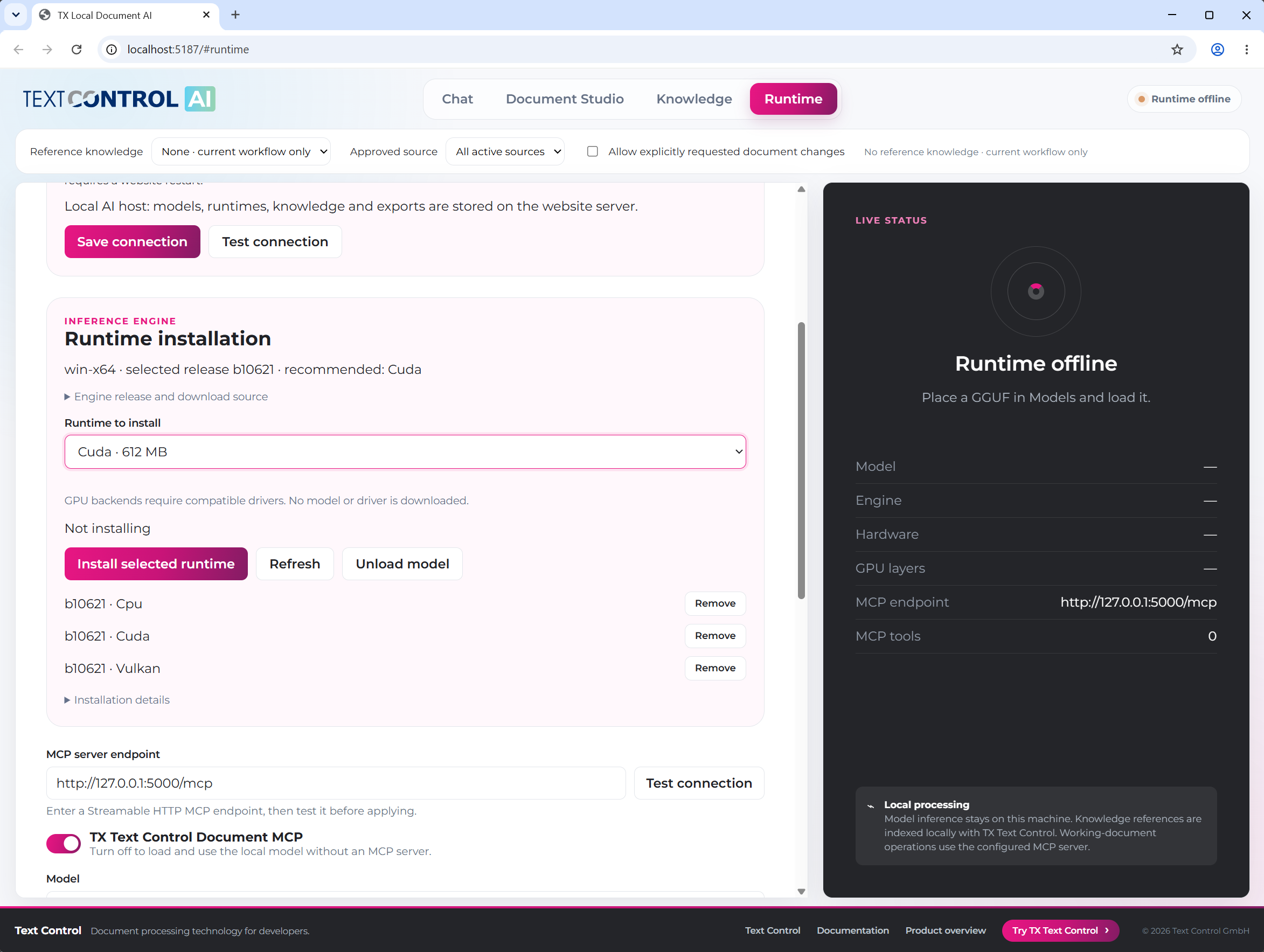
Try it. In Chat, ask for an invoice, change it and export it as PDF. In Document Studio, open one of the included documents and rewrite a selection.
The other samples cover single topics:
| Sample | Shows | Described in |
|---|---|---|
LocalChat, LocalStreaming | A console chat and a streamed answer with a local model | Local / Private LLMs, Chat with Documents |
LocalStructuredOutput | Typed JSON extraction from an invoice | Document Analysis |
LocalToolCalling, McpChat | A model that calls functions and document tools | Agent Workflows |
MinimalWeb | A small web page with the browser client | This page, below |
AiService | AI integration, runtime and knowledge in a separate service | Local / Private LLMs |
MinimalMcpHost, McpServer | Hosting the MCP document server | MCP Document Server |
Add the AI Endpoints to ASP.NET Core
TXTextControl.AI.AspNetCore adds the AI workflows to your own ASP.NET Core application. The following Program.cs is a development host that only listens on the local machine:
using TXTextControl.AI.AspNetCore;

var builder = WebApplication.CreateBuilder(args);
builder.WebHost.UseUrls("http://127.0.0.1:5001");
builder.WebHost.ConfigureKestrel(o => o.Limits.MaxRequestBodySize = 64 * 1024 * 1024);
builder.Services.AddTextControlAI(builder.Configuration.GetSection("LocalAI"));

var app = builder.Build();
app.UseStaticFiles();
app.UseTextControlAI();
app.MapTextControlAI(enableRuntimeConfiguration: false);
app.Run();
The settings come from the LocalAI section of appsettings.json. This example assumes that the runtime is already provisioned:
{
  "LocalAI": {
    "ModelDirectory": "Models",
    "ModelPath": "chat.gguf",
    "WarmupOnStartup": false,
    "AutoInstallRuntime": false,
    "McpEndpoint": "http://127.0.0.1:5000/mcp",
    "ContextSize": 8192,
    "Generation": { "MaxOutputTokens": 1024 }
  }
}
The code works as follows:
AddTextControlAIregisters the AI services with theLocalAIsettings, andUseTextControlAIadds the session middleware, so that each browser session keeps its own chat history.MapTextControlAImaps the endpoints under/api, for examplePOST /api/chatfor chat requests andPOST /api/document/assistfor document requests. Both stream their progress and results as newline-delimited JSON.enableRuntimeConfiguration: falseleaves out the endpoints that change the loaded model.McpEndpointis the address of the MCP document server, which document requests need.
Neither UseTextControlAI nor MapTextControlAI adds authentication. Before a deployment, configure authentication and authorization and protect the mapped endpoints with policies of your application; never expose the configuration and model-loading endpoints without authentication.
A page of your application loads the browser client from the package's static web assets:
<script src="/_content/TXTextControl.AI.AspNetCore/client.js"></script>
With the script loaded, the page sends a chat request and shows the progress messages and the answer:
const ai = new TXTextControlAI.Client({ apiBaseUrl: "/api" });

const answer = await ai.chat("Explain this workflow.", event => {
    if (event.type === "status") console.log(event.message);
});

console.log(answer.text);
chat streams the status events to its callback and resolves with the final answer, including files that a request exported. The optional editor.js binds the AI requests to the Document Editor, for example to summarize or rewrite the selected text. The MinimalWeb sample shows a complete page.
Preview Limits
- APIs change. Plan for changes between preview versions, and pin the package version you test with.
- Samples aren't production systems. The minimal samples are loopback-only development samples. The full samples are private single-user deployment helpers, not a multi-tenant identity system; outside development, the MCP document server requires service authentication and HTTPS.
- Review and data protection. Results need review, and local models aren't compliant by themselves, as Data Protection and Review describes.
The blog article Introducing TX Text Control AI: Private AI for Real Document Workflows in .NET C# presents the preview with its workflows and deployment options.
Next Steps
- Local / Private LLMs: provide the runtime and choose a model.
- MCP Document Server: host the document tools.
- RAG: ground answers in approved documents.
- Examples: all samples and repositories.