
Signature Validation
Before a signed contract goes into the archive or an uploaded invoice is paid, somebody has to confirm that its signatures still hold. People do this in a PDF reader such as Adobe Acrobat. Applications do it in code with the TXTextControl.PDF.Validation package, which lists every signature of a PDF with its signer, its signing time and whether the signed bytes are unchanged. Knowing exactly what the package checks, and what it leaves to other tools, lets you build a validation step that you can rely on.
Installing the package and its PDF/UA report are described in PDF Validation. A first check of a signed PDF, in Acrobat Reader and as JSON, is part of Verify the Signed PDF in Getting Started.
What a Validator Checks
A signature can be checked long after it was created. A complete validation answers these questions:
- Is the signature mathematically correct? A hash of the signed bytes is calculated again and compared with the hash in the signature. If a single character of the signed content changed, the hashes differ and the signature is invalid.
- Was the certificate trusted? The signer's certificate must lead to a certificate authority that the validator trusts.
- Was the certificate valid when the document was signed? A certificate expires or can be revoked. A trusted timestamp proves when the signature was created, as RFC 3161 Timestamps describes.
- Has the document changed since it was signed? Content added after the signature isn't covered by it.
Adobe Acrobat and Acrobat Reader answer these questions in their Signatures panel. TX Text Control itself doesn't verify signatures: ServerTextControl creates them when it saves a PDF, and the Document Viewer collects them from users.
What the Package Checks
The TXTextControl.PDF.Validation package checks the integrity of the signatures in a PDF:
- It finds every signature of the file and reads the byte ranges that each signature covers.
- It verifies each signature cryptographically against the bytes it covers.
- It checks whether a signature covers the whole file, or whether bytes were added after it.
- It reports the signer and the signing time that the signature contains.
The diagnostics hold no verdict on the certificate. They name the subject of the signer's certificate and the time that the signature contains, and nothing beyond that about the certificate chain, its validity period or its revocation. A signature that the package reports as intact therefore proves that the signed bytes are unchanged, not that the certificate behind them was trusted. For the trust of a certificate, use a validator such as Adobe Acrobat.
The signature results don't affect the PDF/UA result: a broken signature doesn't make IsPass false, and a valid signature doesn't make an inaccessible document pass. Check the signatures separately, as the following sections do.
Check the Signatures of a PDF
The signature results are in report.Diagnostics.Signatures. The following Program.cs of a .NET 10 console application with the package installed validates Documents/signed.pdf and prints each signature:
using TXTextControl.PDF.Validation;
using TXTextControl.PDF.Validation.Model;

Report report = PdfUaValidator.Validate("Documents/signed.pdf");
SignatureDiagnostics signatures = report.Diagnostics.Signatures;

if (!signatures.HasSignatures)
{
    Console.WriteLine("The document isn't signed.");
    return;
}

Console.WriteLine($"Signatures: {signatures.Count}");
Console.WriteLine($"All intact: {signatures.AllSignatureBytesIntact}");
Console.WriteLine($"All cover the whole document: {signatures.AllCoverWholeDocument}");

foreach (SignatureDiagnostic signature in signatures.Items)
{
    Console.WriteLine($"Signer: {signature.SignerSubject}");
    Console.WriteLine($"  Format: {signature.SubFilter}");
    Console.WriteLine($"  Signing time: {signature.SigningTime}");
    Console.WriteLine($"  Bytes intact: {signature.SignatureBytesIntact}");
    Console.WriteLine($"  Covers whole document: {signature.CoversWholeDocument}");
    Console.WriteLine($"  Probably modified after signing: {signature.ProbablyModifiedAfterSigning}");

    if (signature.FailureReason is not null)
    {
        Console.WriteLine($"  Failure: {signature.FailureReason}");
    }
}
SignatureDiagnostics summarizes the signatures of the document:
| Member | Contains |
|---|---|
HasSignatures, Count | Whether the document has signatures, and how many |
AllSignatureBytesIntact | true if every signature of the document is intact |
AllCoverWholeDocument | true if every signature covers the whole file |
Items | One SignatureDiagnostic per signature of the document |
Each SignatureDiagnostic describes one signature:
| Member | Contains |
|---|---|
SignatureBytesIntact | Whether the cryptographic check of the signature over its bytes succeeded |
CoversWholeDocument | Whether the signature covers the complete file |
ProbablyModifiedAfterSigning | Whether the file was changed after the signature was created |
SignerSubject | The subject of the signer's certificate, for example CN=MyTXCert |
SigningTime | The signing time stored in the signature |
FailureReason | Why the check failed, or null |
SubFilter | The subfilter of the signature, the format in which the PDF stores it |
A diagnostic also carries the ByteRange values of its signature and the range that the signature itself occupies in the file.
Interpret the Results
- Intact and covering the whole document. The file hasn't changed since the signature was created.
- Not intact. Signed content was changed.
FailureReasonexplains the failure, for example "Cryptographic verification failed: The hash value is not correct.", andSignerSubjectandSigningTimestay empty. - Intact, but not covering the whole document. The signed bytes are unchanged, but the file holds bytes that this signature doesn't cover. Documents with several signatures are the subject of Multiple Signatures.
Reject Uploads With Broken Signatures
An application that accepts signed documents checks them before it stores them. The following ASP.NET Core controller action refuses a PDF that isn't signed or whose signature isn't intact:
using Microsoft.AspNetCore.Mvc;
using TXTextControl.PDF.Validation;
using TXTextControl.PDF.Validation.Model;
public class ContractController : Controller
{
[]
public async Task<IActionResult> Upload(IFormFile file)
{
if (file is null || file.Length == 0)
{
return BadRequest("No PDF was uploaded.");
}
byte[] pdf;
using (MemoryStream stream = new MemoryStream())
{
await file.CopyToAsync(stream);
pdf = stream.ToArray();
}
SignatureDiagnostics signatures = PdfUaValidator.Validate(pdf).Diagnostics.Signatures;
if (!signatures.HasSignatures)
{
return UnprocessableEntity("The document isn't signed.");
}
if (!signatures.AllSignatureBytesIntact || !signatures.AllCoverWholeDocument)
{
return UnprocessableEntity(signatures.Items.Select(signature => new
{
signature.SignatureBytesIntact,
signature.CoversWholeDocument,
signature.FailureReason
}));
}
// Store or archive the document here
return Ok(new
{
signatures.Count,
Signers = signatures.Items.Select(signature => signature.SignerSubject)
});
}
}
The code works as follows:
Validatehas an overload for a byte array, so the upload is copied into memory and validated without a file.- The action ignores
report.StatusandIsPass, because they describe PDF/UA conformance, not the signatures. AllSignatureBytesIntactandAllCoverWholeDocumentsummarize the signatures of the document, andItemsholds the result of each one for the error message.- The response names the subjects of the signers for information only. Because the diagnostics say nothing about the certificates, compare a subject with an expected value only together with a certificate check in another tool.
Test That Tampering Is Detected
A test shows what the results look like for a changed document. The following program signs a PDF and prints the result of the check, so that you can run it again after changing the file. Besides TXTextControl.PDF.Validation, the project needs the TX Text Control package and the test certificate certificate.pfx of Self-Signed Certificates:
using System.Security.Cryptography.X509Certificates;
using TXTextControl;
using TXTextControl.PDF.Validation;
using TXTextControl.PDF.Validation.Model;

X509Certificate2 certificate = X509CertificateLoader.LoadPkcs12FromFile(
    "certificate.pfx", "123", X509KeyStorageFlags.Exportable);

if (!File.Exists("signed.pdf"))
{
    using (ServerTextControl tx = new ServerTextControl())
    {
        tx.Create();
        tx.Text = "The invoice total is 1,250.00 USD.";

        SaveSettings saveSettings = new SaveSettings()
        {
            DigitalSignature = new DigitalSignature(certificate, null)
        };

        tx.Save("signed.pdf", StreamType.AdobePDF, saveSettings);
    }
}

SignatureDiagnostic signature =
    PdfUaValidator.Validate("signed.pdf").Diagnostics.Signatures.Items[0];

Console.WriteLine($"Intact: {signature.SignatureBytesIntact}");
Console.WriteLine($"Covers whole document: {signature.CoversWholeDocument}");
Console.WriteLine($"Probably modified: {signature.ProbablyModifiedAfterSigning}");
Console.WriteLine($"Signer: {signature.SignerSubject}");
Console.WriteLine($"Failure: {signature.FailureReason}");
Run the program: it creates signed.pdf and reports the signature as intact, covering the whole document and not modified. Now open signed.pdf in a text editor, change a value in the PDF metadata, such as the text of the /Producer entry, save the file and run the program again. It keeps the changed file and validates it:
Intact: False
Covers whole document: False
Probably modified: True
Signer:
Failure: Cryptographic verification failed: The hash value is not correct.
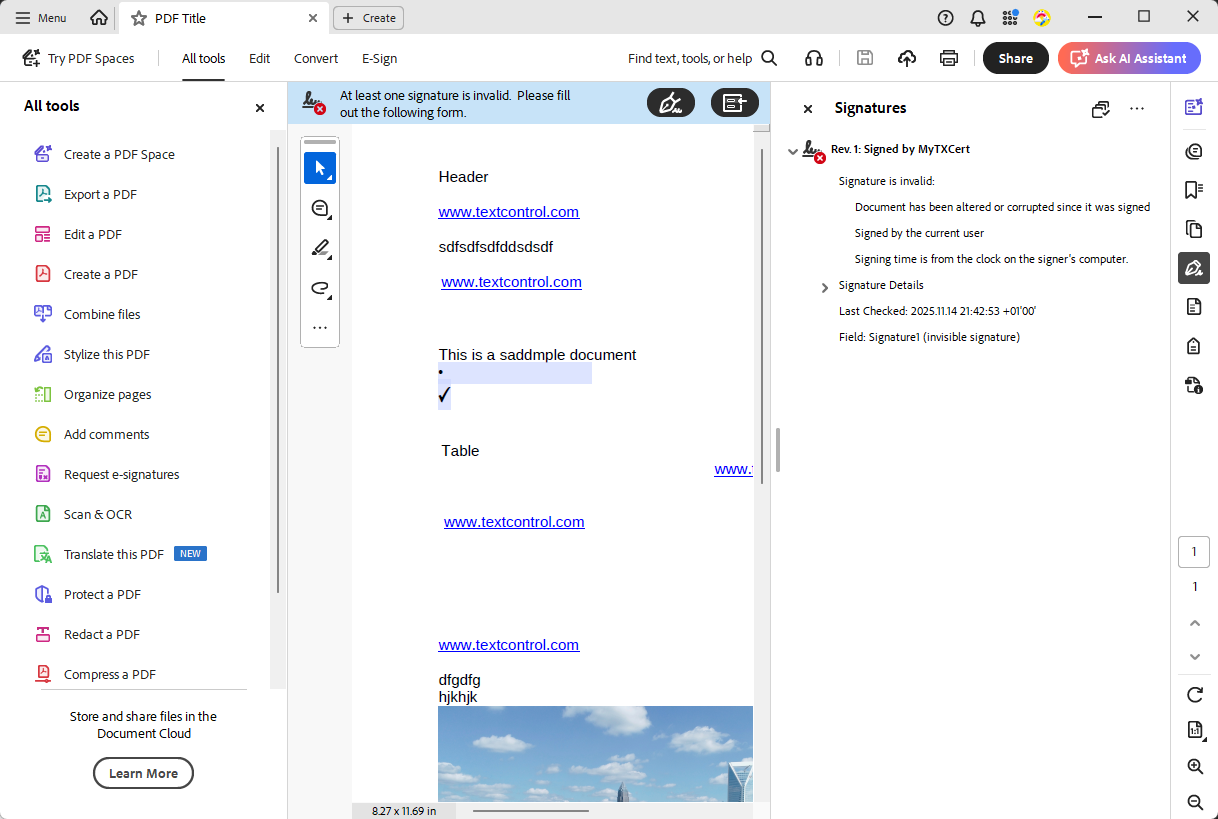
A single changed character is enough: the hash of the signed bytes no longer matches the hash in the signature, and the signer and the signing time are no longer reported. Adobe Acrobat Reader reaches the same verdict for the changed file: it states that at least one signature is invalid and that the document has been altered or corrupted since it was signed.
The blog article Validate Digital Signatures and the Integrity of PDF Documents in C# .NET runs the same test.
To keep a record of each check, store the JSON of PdfUaValidator.ToJson(report, indented: true) next to the document. The signatures appear in it under diagnostics.signatures, with camel-case names.
Next Steps
- Multiple Signatures: understand the results for documents with several signatures.
- RFC 3161 Timestamps: add a trusted signing time.
- Certificate-Based Signatures: use certificates that validators trust.
- PDF Validation: check the same documents against PDF/UA.