
Nested Blocks
Orders with their articles, customers with their contacts, departments with their employees: master-detail data has levels, and a template for it has merge blocks inside merge blocks. You shape nested data as JSON, business objects or a DataSet with relations, create nested blocks in code, read the hierarchy of a template and control what happens when a level has no data.
Merge Blocks in Getting Started shows the first nested data, and Merge Blocks describes blocks at one level.
How Nested Blocks Work
A master-detail relationship is a one-to-many relationship: an order has many articles. In a template, the outer block, here orders, is repeated for each order, and the inner block, articles, is repeated for the articles of the current order. MailMerge descends into the hierarchy recursively, so blocks can be nested in any number of levels.
- Block names match the data. Each block is named like the array, collection or table that provides its records.
- Fields refer to the current record of their block. In the
articlesblock, the fieldqtyis the quantity of the current article, andproduct.nameaddresses the name of its nestedproductobject. Fields of the order stay outside thearticlesblock. - Blocks don't overlap. An inner block lies completely inside its outer block. The start or the end of two blocks can be at the same position.
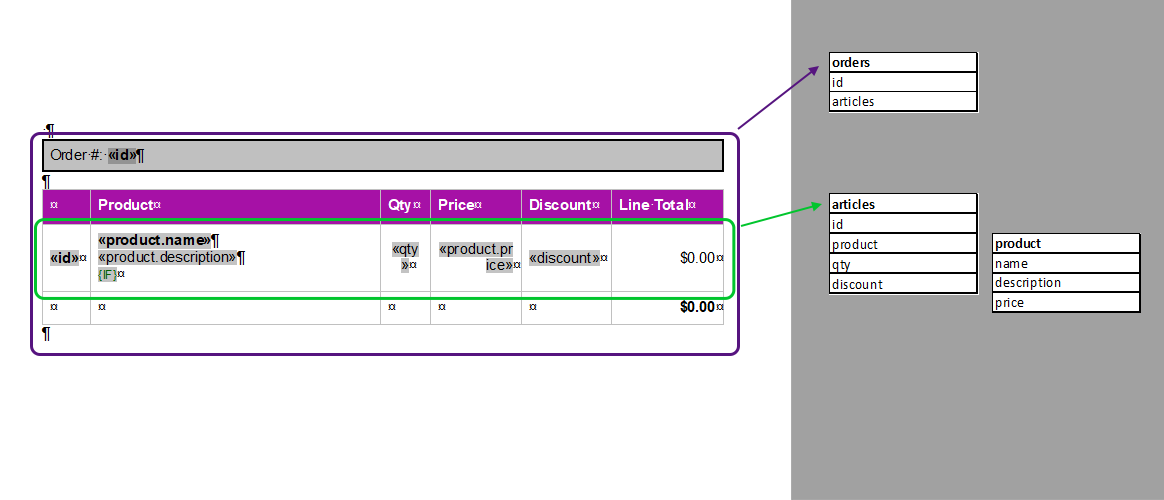
A common layout is a paragraph block for each order with a table inside, whose row is the block for the articles.
Shape Nested Data
Nested arrays in JSON map to nested blocks. Save the following data as orders.json; it extends the sample of Getting Started with a second order:
[
  {
    "company_name": "Text Control, LLC",
    "orders": [
      {
        "id": 123,
        "articles": [
          {
            "id": 1,
            "product": { "name": "Product A", "price": 200 },
            "qty": 5
          }
        ]
      },
      {
        "id": 321,
        "articles": [
          {
            "id": 2,
            "product": { "name": "Product B", "price": 50 },
            "qty": 12
          }
        ]
      }
    ]
  }
]
The template for this data has these elements:
| Level | Element | Fields |
|---|---|---|
| Root | Merge fields outside all blocks | company_name |
| 1 | Merge block orders | id |
| 2 | Merge block articles, inside orders | product.name, qty |
The blog article Mail Merge: The Pre-Shaped Data Concept Explained designs a template for such data: the orders block holds an order number and a table, whose row is the articles block with fields such as product.name and qty:
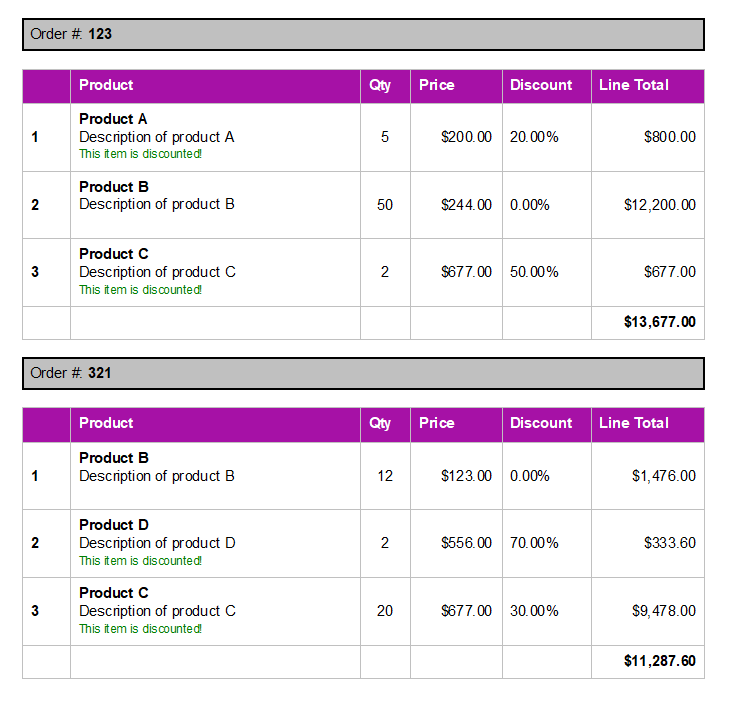
Merged with two orders, the orders block is repeated twice, and each table has one row for each article of its order:
Create a Nested Template in Code
MergeBlockInfo.ChildBlocks holds the blocks nested inside a block. Pass a MergeBlockInfo with child blocks to InsertMergeBlock, and all levels are inserted in one call:
using TXTextControl;
using TXTextControl.DocumentServer;
using TXTextControl.DocumentServer.DataSources;

string jsonData = File.ReadAllText("orders.json");

using (ServerTextControl tx = new ServerTextControl())
{
    tx.Create();

    DataSourceManager dataSourceManager = new DataSourceManager();
    dataSourceManager.LoadJson(jsonData);

    // Outer block: repeated for each order
    MergeBlockInfo ordersBlock = new MergeBlockInfo("orders")
    {
        ColumnNames = new List<string> { "id" },

        // Inner block: repeated for each article of the current order
        ChildBlocks = new List<MergeBlockInfo>
        {
            new MergeBlockInfo("articles")
            {
                ColumnNames = new List<string> { "product.name", "qty" }
            }
        }
    };

    dataSourceManager.InsertMergeBlock(tx, ordersBlock,
        new MergeBlockSettings(BlockTemplateType.TableRow, true));

    // Keep the generated template
    tx.Save("orders-template.tx", StreamType.InternalUnicodeFormat);

    using (MailMerge mailMerge = new MailMerge { TextComponent = tx })
    {
        mailMerge.MergeJsonData(jsonData);
    }

    tx.Save("orders.pdf", StreamType.AdobePDF);
}
The code works as follows:
- LoadJson analyzes the data, including its nested arrays.
- Each MergeBlockInfo describes one level: its name and, in
ColumnNames, the merge fields of that level.product.nameaddresses the nested object of an article with dot notation. - InsertMergeBlock creates the tables, merge fields and blocks of all levels, each inner block inside its outer block.
- The template is saved as orders-template.tx before the merge, so the following examples can use it.
The online demo Nested Merge Block Designer builds nested blocks with several levels in the Document Editor this way.
Read the Block Hierarchy of a Template
A MergeBlockInfo that is created from an existing block contains its child blocks. The following program prints the block hierarchy of orders-template.tx:
using TXTextControl;
using TXTextControl.DocumentServer.DataSources;

using (ServerTextControl tx = new ServerTextControl())
{
    tx.Create();
    tx.Load("orders-template.tx", StreamType.InternalUnicodeFormat);

    foreach (SubTextPart subTextPart in tx.SubTextParts)
    {
        // Start with the merge blocks at the top level
        if (DataSourceManager.IsMergeBlock(subTextPart) && subTextPart.NestedLevel == 1)
        {
            PrintBlock(new MergeBlockInfo(subTextPart), 0);
        }
    }
}

// Prints a block and, indented, its child blocks
static void PrintBlock(MergeBlockInfo block, int depth)
{
    Console.WriteLine($"{new string(' ', depth * 2)}{block.TableName}");

    if (block.ChildBlocks == null)
    {
        return;
    }

    foreach (MergeBlockInfo child in block.ChildBlocks)
    {
        PrintBlock(child, depth + 1);
    }
}
SubTextPart.NestedLevel is 1 for a block at the top level, and TableName is the name of the data a block is bound to. The program prints orders and, indented, articles.
Merge Nested Business Objects
With business objects, a property of type IEnumerable provides the records of the block with its name, at every level. The following program merges the same template with objects:
using TXTextControl;
using TXTextControl.DocumentServer;

Company company = new Company
{
    company_name = "Text Control, LLC",
    orders = new List<Order>
    {
        new Order
        {
            id = 123,
            articles = new List<Article>
            {
                new Article { id = 1, qty = 5, product = new Product { name = "Product A", price = 200 } }
            }
        }
    }
};

using (ServerTextControl tx = new ServerTextControl())
{
    tx.Create();
    tx.Load("orders-template.tx", StreamType.InternalUnicodeFormat);

    using (MailMerge mailMerge = new MailMerge { TextComponent = tx })
    {
        mailMerge.MergeObject(company);
    }

    tx.Save("orders.pdf", StreamType.AdobePDF);
}

public class Company
{
    public string company_name { get; set; } = "";
    public List<Order> orders { get; set; } = new List<Order>();
}

public class Order
{
    public int id { get; set; }
    public List<Article> articles { get; set; } = new List<Article>();
}

public class Article
{
    public int id { get; set; }
    public Product product { get; set; } = new Product();
    public int qty { get; set; }
}

public class Product
{
    public string name { get; set; } = "";
    public decimal price { get; set; }
}
The property names match the names of the blocks and fields in the template. MergeObject merges the single company; MergeObjects merges a collection of them.
Merge a DataSet With Relations
In a DataSet, relations define the levels. Each block is named like a DataTable, and a DataRelation connects each table with the table of its parent block. Merge the master table with Merge, and MailMerge follows the relations into the nested blocks:
using System.Data;
using TXTextControl;
using TXTextControl.DocumentServer;

DataSet dataSet = new DataSet();

DataTable company = dataSet.Tables.Add("company");
company.Columns.Add("company_id", typeof(int));
company.Columns.Add("company_name");
company.Rows.Add(1, "Text Control, LLC");

DataTable orders = dataSet.Tables.Add("orders");
orders.Columns.Add("company_id", typeof(int));
orders.Columns.Add("id", typeof(int));
orders.Rows.Add(1, 123);
orders.Rows.Add(1, 321);

DataTable articles = dataSet.Tables.Add("articles");
articles.Columns.Add("order_id", typeof(int));
articles.Columns.Add("product_id", typeof(int));
articles.Columns.Add("qty", typeof(int));
articles.Rows.Add(123, 1, 5);
articles.Rows.Add(321, 2, 12);

DataTable product = dataSet.Tables.Add("product");
product.Columns.Add("product_id", typeof(int));
product.Columns.Add("name");
product.Columns.Add("price", typeof(decimal));
product.Rows.Add(1, "Product A", 200m);
product.Rows.Add(2, "Product B", 50m);

// The relations connect each block with the rows of its parent
dataSet.Relations.Add(new DataRelation("company_orders",
    company.Columns["company_id"]!, orders.Columns["company_id"]!));
dataSet.Relations.Add(new DataRelation("order_articles",
    orders.Columns["id"]!, articles.Columns["order_id"]!));

// Fields with the prefix product. reach the product of an article
dataSet.Relations.Add(new DataRelation("article_product",
    articles.Columns["product_id"]!, product.Columns["product_id"]!, false));

using (ServerTextControl tx = new ServerTextControl())
{
    tx.Create();
    tx.Load("orders-template.tx", StreamType.InternalUnicodeFormat);

    using (MailMerge mailMerge = new MailMerge { TextComponent = tx })
    {
        // Merge the master table; the related tables fill the nested blocks
        mailMerge.Merge(company, true);
    }

    tx.Save("orders.pdf", StreamType.AdobePDF);
}
The code works as follows:
- The relations
company_ordersandorder_articlesconnect each block with its parent, and the tables are named like the blocksordersandarticles. - Inside the
articlesblock, the fieldqtyhas no prefix, because it is a column of the block's own table. The fieldproduct.namehas the prefixproduct: a prefix inside a block starts at the table of the block and follows the relationarticle_productto the product of the current article. - The last parameter of the
DataRelationconstructor,false, creates the relation without constraints. With constraints, theDataSetwould require a uniqueproduct_idinarticles, so two articles of the same product couldn't be added.
Each order of the merged document lists its articles with the product name and the quantity. Prefixes can span more than one relation, such as product.supplier.name for a supplier table related to product, as Merge Fields describes.
Repeat Table Headers per Block
A header row of a table is repeated at the top of each page with the content it had first. When a nested block is a table row inside a table, a header row that shows data of the outer block, such as the order number, would show the first order on every page. Put the whole table, including its header row, inside the outer block instead: each order then gets its own table with its own header. The blog article MailMerge: Table Headers and Repeating Blocks shows both layouts.
Handle Levels Without Data
RemoveEmptyBlocks, true by default, applies to every level: a block without data is removed, and when the data of an outer block is missing, the block is removed with all blocks inside it. An order without articles keeps its order block, but its articles block disappears.
To merge an inner block only for parent records that meet a condition, such as orders above a certain amount, set BlockMergingCondition on the inner block, as Sorting and Filtering describes.
Next Steps
- Sorting and Filtering: sort and filter the rows of each level.
- Data Sources: the rules for JSON, objects and
DataSetdata. - Template Assistant: design nested blocks in an online demo.