
What's New in TX Text Control .NET Server 34.0
Version 34.0 tags every PDF that TX Text Control .NET Server writes, adds RTF documents and EMF images to the Core engine and completes the Document Editor's dialog boxes on Linux. Read on for every feature, class, property, method and event it added since version 33.0, each linked to the page or the reference member that describes it.
Version 34.0 was released in November 2025 and is the current major version. Text Control released TX Text Control .NET for Windows Forms, TX Text Control .NET for WPF and TX Text Control ActiveX 34.0 at the same time. The changes of the service packs that followed are listed on Service Packs.
Version 34.0 at a Glance
| Area | What is new |
|---|---|
| Tagged PDF documents for PDF/UA and PDF/A-3a, descriptive texts for links, form fields, tables and frames | |
| Core engine | RTF documents and EMF images on Windows and Linux |
| Document Editor | All dialog boxes on the Core engine, changed ribbons and context menus, the insertion mode in the JavaScript API |
| Mail merge | The FrameMergedEventArgs base class and the descriptive text of merged images |
| .NET | .NET 8, .NET 9 and .NET 10, Visual Studio 2022 and Visual Studio 2026 |
| Packages | Markdown, PDF/UA validation and parallel mail merge on nuget.org, collaboration and AI as previews |
PDF Accessibility and Archiving
Version 34.0 changes the structure of the PDF documents that TX Text Control writes. Your existing code produces the new structure without changes. What TX Text Control can't produce on its own are the descriptive texts of your content, and version 34.0 adds the properties to set them.
- Tagged PDF. A PDF document now contains a logical structure of headings, paragraphs, tables and other elements in addition to its visible content, which PDF/UA describes.
- PDF/UA by default. PDF/UA (ISO 14289) is the standard for PDF documents that people who use assistive technologies, such as screen readers, can read. PDF documents exported with version 34.0 contain the tags and metadata that PDF/UA requires. Whether a document fully complies depends on its content: if some images have no descriptive text, the PDF is structured but not fully compliant. See PDF/UA.
- PDF/A-3a. When you save a document with
StreamType.AdobePDFA, TX Text Control writes PDF/A-3a, the level of the archiving standard PDF/A that includes the tagged structure. A document can comply with PDF/A-3a and PDF/UA at the same time. See PDF/A. - Descriptive texts. A descriptive text describes an element that a screen reader can't read from the text itself, for example an image or a table. Five new
DescriptiveTextproperties set it.
The DescriptiveText Properties
| Property | Describes |
|---|---|
| HypertextLink.DescriptiveText | A hypertext link, which points to a target outside the document |
| DocumentLink.DescriptiveText | A document link, which points to a target in the same document |
| FormField.DescriptiveText | A form field |
| Table.DescriptiveText | A table |
| FrameBase.DescriptiveText | A frame: an Image, TextFrame, SignatureField, ChartFrame, BarcodeFrame or DrawingFrame, which all derive from FrameBase |
PDF/UA shows how to set these properties in code and how to add descriptions to existing documents, and PDF/A compares PDF/A-3a with PDF/UA.
Core Engine: RTF and EMF
TX Text Control .NET Server has two engines: Core, in the TXTextControl.TextControl.Core.SDK package, runs on Windows and Linux, and Classic, in TXTextControl.TextControl.ASP.SDK, runs on Windows only. Version 34.0 adds two capabilities to Core that were available only in Classic before:
- RTF documents. Core has a complete RTF filter. It loads and saves RTF documents (
StreamType.RichTextFormat) on Windows and Linux. - EMF images. Documents can contain images in the Windows Enhanced Metafile format (EMF). When you save a document, Core converts these images to SVG.
Supported File Formats compares the formats of the two engines.
Document Editor
The Document Editor is the WYSIWYG word processor that you embed in your web application.
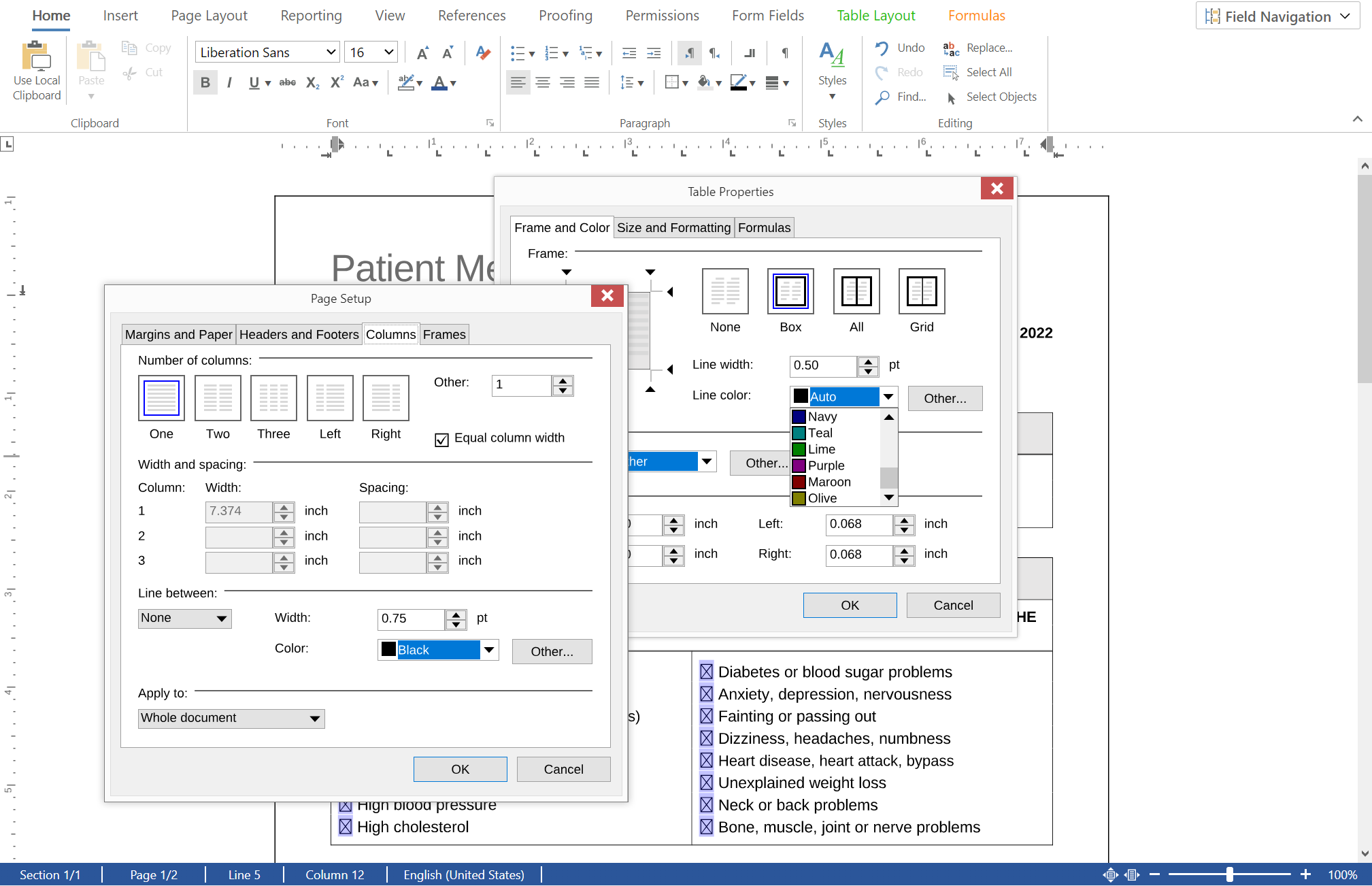
- Dialog boxes on the Core engine. All built-in dialog boxes are now available in the Document Editor on the Core engine, on Linux as well as on Windows. Before 34.0, some of them were available only in the Windows edition.
- Ribbons and context menus. The ribbons and context menus of the Document Editor on Linux have been changed and now have the same functionality as on Windows. If your application customizes them, test the customizations after the upgrade. See Ribbon and UI.
- Descriptive texts. Users can set descriptive texts in the dialog boxes and the ribbon. In the JavaScript API, a pair of methods reads and sets the descriptive text of each element. To remove a text, pass an empty string or
nullto the set method. - Insertion mode. getInsertionMode and setInsertionMode of the
TXTextControlobject read and set whether typed text is inserted at the input position or overwrites the text there. The values areInsertandOverwriteof the InsertionMode enumeration. setShowKeyStates and getShowKeyStates of theStatusBarViewGeneratorobject set and read whether the status bar shows the current insertion mode.
Page Setup and Table Properties are two of the dialog boxes that the Document Editor now shows on the Core engine:
The new descriptive text methods of the JavaScript API:
| Object | Methods |
|---|---|
DocumentLink | getDescriptiveText, setDescriptiveText |
FormField | getDescriptiveText, setDescriptiveText |
FrameBase | getDescriptiveText, setDescriptiveText |
HypertextLink | getDescriptiveText, setDescriptiveText |
Table | getDescriptiveText, setDescriptiveText |
TextFrame | getDescriptiveText, setDescriptiveText |
Mail Merge
MailMerge creates documents from a template and data. It raises events when it has merged a barcode, a chart or an image, and version 34.0 extends the arguments of these events.
- A base class for merged frames. The new abstract class FrameMergedEventArgs is the base class of the event arguments that describe a frame merged during a mail merge. BarcodeMergedEventArgs, the argument of the BarcodeMerged event, and ChartMergedEventArgs, the argument of the ChartMerged event, derive from it.
- The descriptive text of merged images. In a handler of the ImageMerged event, which occurs when an image has been merged, ImageMergedEventArgs.DescriptiveText reads the descriptive text of the image. Set the property to replace it.
FrameMergedEventArgs provides these properties:
| Property | Returns |
|---|---|
| Frame | The frame that has been merged |
| DataRow | The data row that supplied the frame with merge content |
| MergeBlockName | The name of the merge block, a section of the template that is repeated for each record, if the frame is part of one |
| NestingDepth | The one-based nesting depth of that merge block |
| SubTextPartID | The ID of the SubTextPart, a user-defined part of the document, that contains the frame, or 0 |
| SubTextPartNumber | The one-based number of that subtext part, or 0 |
.NET and Visual Studio
- .NET 10. The NuGet packages support .NET 8, .NET 9 and .NET 10. Text Control tested version 34.0 with .NET 10 (Long Term Support), including ASP.NET Core and Blazor applications, and existing TX Text Control code runs on .NET 10 without code changes. See .NET Versions.
- Visual Studio 2026. Version 34.0 supports Visual Studio 2022 and Visual Studio 2026, and Text Control tested its NuGet packages and Visual Studio tooling with Visual Studio 2026. See Development Environments.
The blog article Day-1 Support for .NET 10 in TX Text Control 34.0 describes the tests.
Packages Released During Version 34.0
Some features of the 34.0 period come in packages of their own on nuget.org rather than in the SDK packages or the service packs. Most of them work together with the engine package TXTextControl.TextControl.Core.SDK from the private feed; Packages on nuget.org describes what each one needs:
| Package | First release (nuget.org) | What it adds |
|---|---|---|
TXTextControl.Markdown.Core | Betas from September 2025; 34.0.0 in February 2026, 34.1.0 in August 2026 | Loads Markdown into ServerTextControl and saves documents as Markdown, for whole documents, the selection and subtext parts. See Markdown |
TXTextControl.PDF.Validation | A beta in November 2025; 34.1.0 in July 2026 | Checks PDF documents for PDF/UA and reports on their signatures and encryption. See PDF Validation |
TXTextControl.DocumentServer.ParallelMailMerge | 34.0.0 in July 2026 | Runs MailMerge jobs in a pool of worker processes. See Multiple Processes |
TXTextControl.Web.Collaboration | A preview in August 2026 | Several users editing one document in the Document Editor at the same time. See Packages on nuget.org |
TXTextControl.AI and five related packages | Prerelease 0.1.0-beta.1 in September 2026 | A preview that connects language models running on your own infrastructure with TX Text Control: chat, knowledge collections and an MCP server for document operations. See Text Control AI |
Also since version 34.0, Text Control publishes signed software bills of materials (SBOMs) for its NuGet packages, as SBOM describes.
Other API Additions
- ServerVisualization.TextViewGenerator.InsertionMode specifies whether text is inserted or overwrites existing text, with the values
InsertandOverwrite. A TextViewGenerator is a specialServerTextControlthat shows its text as a generated image.
The list of new members in the What's New documentation of version 34.0 also names the HypertextLink class and its Target property, the target a hypertext link points to. Both existed before version 34.0; of HypertextLink, only DescriptiveText is new.
Upgrade to Version 34.0
- No update notes. The Update Notes of version 34.0 list no change to existing classes, properties, methods or events; Breaking Changes explains the
AppendSettingsentry that some renderings show. - Changes to plan for. Breaking Changes lists the package, frontend and behavior changes of version 34.0 that can require work in your application.
- Upgrade steps. Migrating from Previous Versions describes the upgrade of a project from the 33.0 NuGet packages to 34.0.
Next Steps
- Version 33.0: the features of the previous version.
- Breaking Changes: the changes that can require work when you upgrade.
- Service Packs: the changes of the service packs of version 34.0.
- PDF/UA: create accessible PDF documents.
- Introducing TX Text Control 34.0: Your Next Leap in Document Processing: the release announcement on the Text Control Blog.