
Localization
Users who work in a language other than English need the user interface of the Document Editor in their language and values such as dates in the format of their culture. You set both cultures in the ASP.NET Core view and in the other frontends, read them from JavaScript and find out which languages are available.
The examples change the view of the ASP.NET Core tutorial. The language of the document text, which spell checking uses, is a formatting attribute of the text and is described in Spell Checking.
Culture and UI Culture
The editor has two culture settings:
| Setting | Affects | Example |
|---|---|---|
| UI culture | The language of the string resources: the texts of the ribbon, the dialog boxes and the messages | "de-DE" shows a German user interface |
| Culture | The formats of values such as dates and times, and the unit of the rulers when their unit is Auto | "de-DE" formats dates the German way |
The string resources come from the server. The editor raises the ribbonTabsLoaded event when the content of the ribbon has been loaded and the string resources have been applied, so code that changes texts or elements of the ribbon waits for this event; see Events.
English and German string resources are built in. If the view sets no culture, the editor uses the language of the browser to select the string resources and the units of measurement.
Set the Cultures in the ASP.NET Core View
TextControlSettings.UICulture and TextControlSettings.Culture set the cultures when the view is rendered. The following view shows the editor with a German user interface and German formats. Replace the content of Views/Home/Index.cshtml:
@using TXTextControl.Web.MVC

@{
    var sDocument = "<html><body><p>Welcome to <strong>Text Control</strong></p></body></html>";
}

@Html.TXTextControl().TextControl(settings => {
    settings.UserNames = new string[] { "Tim Typer" };
    settings.UICulture = System.Globalization.CultureInfo.GetCultureInfo("de-DE");
    settings.Culture = System.Globalization.CultureInfo.GetCultureInfo("de-DE");
}).LoadText(sDocument, TXTextControl.Web.StringStreamType.HTMLFormat).Render()

<script>
    TXTextControl.addEventListener("textControlLoaded", function () {
        var cultures = TXTextControl.getCultures();
        console.log("Culture: " + cultures.culture + ", UI culture: " + cultures.uiCulture);
    });
</script>
The code works as follows:
- Both properties take a
System.Globalization.CultureInfoobject, whichCultureInfo.GetCultureInforeturns for a culture name such as"de-DE". UICultureselects the German string resources, so the ribbon and the dialog boxes are shown in German.Culturesets the formats of dates and times and the unit of the rulers.- TXTextControl.getCultures returns a CultureSettings object directly, without a callback. Its culture and uiCulture contain the culture names the editor uses.
Run the application: the ribbon tabs are labeled in German, and the browser console shows "Culture: de-DE, UI culture: de-DE". The rulers switch to centimeters, the unit of the German culture:
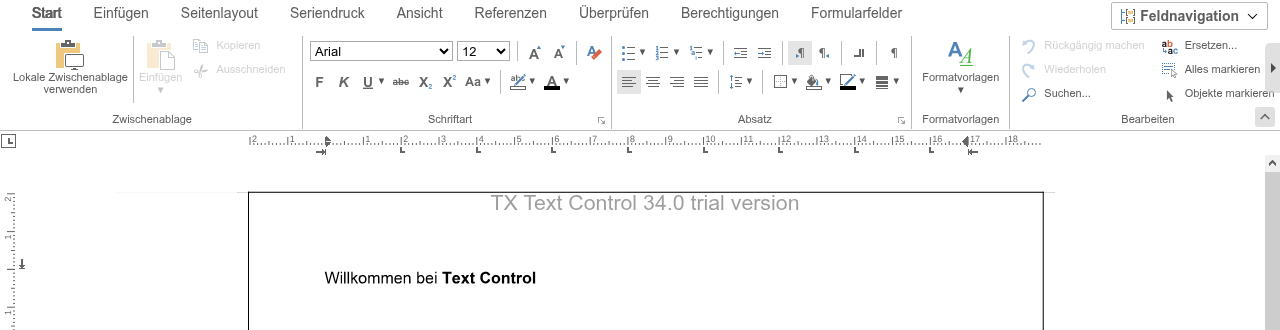
The picture shows a plain JavaScript page that sets both cultures to de-DE in the init settings, as in the next section.
The JavaScript API can read the cultures, but it has no method that changes them. Set them when the editor is created.
Set the Cultures in Other Frontends
- Plain JavaScript page. Pass culture and uiCulture of DocumentEditorSettings as
editorSettingsto TXTextControl.init. Both are strings. - Angular. The
tx-document-editorcomponent has the attributescultureanduiCulture. - React. The
DocumentEditorcomponent has the propertiescultureanduiCulture.
The page of the JavaScript tutorial creates the editor with German cultures like this:
TXTextControl.init({
  containerID: "txDocumentEditor",
  webSocketURL: "wss://localhost:7118/api/TXWebSocket",
  editorSettings: {
    culture: "de-DE",
    uiCulture: "de-DE"
  }
});
In the Angular tutorial, the attributes are added to the component:
<tx-document-editor
  width="1000px"
  height="500px"
  webSocketURL="wss://localhost:7118/api/TXWebSocket"
  culture="de-DE"
  uiCulture="de-DE">
</tx-document-editor>
The React tutorial lists the properties of its component in the same way.
Other Languages
Languages other than English and German need translated string resources. English and German are built in and can't be changed; every other language comes from a satellite assembly, the .NET mechanism for localized resources, which you build with the Resource Kit of TX Text Control. Resources are selected by culture: a French satellite assembly is used only when the UI culture is French, and the editor then shows the translated texts.
The Files of the Resource Kit
The Resource Kit is the ResourceKit folder of the TX Text Control installation directory, which the Windows setup creates. The version 34.0 Resource Kit contains these files:
| File | Contents |
|---|---|
| TextControl.resx | All built-in texts of TX Text Control, such as the dialog boxes, the messages and the ribbon, as XML; every text is the content of a value element |
| DocumentServer.resx, TXDrawing.resx, TXBarcode.resx, TXTextControl.Web.Server.Process.resx | The texts of the other assemblies, translated the same way |
| buildres.bat | The batch file that builds the satellite assemblies with the .NET Framework SDK tools resgen, al and sn |
| txtextcontrol.public.snk | The public key of TX Text Control, which the build needs |
Build a Satellite Assembly
Install the .NET Framework SDK, whose tools buildres.bat calls.
Translate the texts in the
valueelements of TextControl.resx, and of the other .resx files if their texts appear in your application. The blog article below changes the label of the Reporting tab, the resourceRibbonReportingTab, to "Rapports".Open a command prompt in which the SDK tools can be called, such as the Developer Command Prompt for Visual Studio that the blog article uses, change to the ResourceKit folder and run the batch file with the two-letter ISO 639 code of the language, for example
frfor French:buildres frIt builds txtextcontrol.resources.dll from TextControl.resx, and txdocumentserver.resources.dll, txdrawing.resources.dll, txbarcode.resources.dll and txtextcontrol.web.server.process.resources.dll from the other files.
Create a subfolder named after the language code, such as fr, in the folder of the application that contains the TX Text Control assemblies, and copy the satellite assemblies into it.
Set the UI culture of the editor to the language, for example
fr-FR, as described above.
The Resource Kit names its satellite assemblies after the assemblies of the .NET Framework. The packages of the cross-platform Core engine ship their German resources under other names: TXTextControl.TextControl.Core.SDK has de/TXTextControl.Core.resources.dll and de/TXDocumentServer.Core.resources.dll, and TXTextControl.Web.DocumentEditor.Backend has de/TXTextControl.Web.Server.Core.Process.resources.dll. The Text Control documentation doesn't describe how a Resource Kit build is used with the Core backend of an ASP.NET Core application; ask the Text Control support before you rely on it there.
The registry entries that the Resource Kit documentation adds for the strong-name verification of these assemblies apply to .NET Framework applications only.
The blog article Changing the Language in the Angular Document Editor Using the Resource Kit translates the label of the Reporting tab into French and sets uiCulture and culture to fr-FR. It was written for version 32.0, whose Document Editor backend was a Windows service. Its installation steps, a folder in the TX Text Control installation directory and entries in the Windows registry, belong to that backend. Since version 33.0, the backend of an ASP.NET Core application is a cross-platform process that your application starts, as described in Architecture.
Next Steps
- Ribbon: change the ribbon whose texts the UI culture sets.
- Spell Checking: set the language of the document text.
- Viewing and Printing: set the unit of the rulers.