
Attachments
A PDF file can carry other files inside it: the XML data of an electronic invoice next to its printable pages, the JSON data a report was merged from or a spreadsheet with the details of a contract. TX Text Control embeds such attachments when it saves a document as PDF or PDF/A and reads them from the PDF documents you receive. You attach files with a MIME type and a relationship, create PDF/A-3 invoices with embedded XML, extract attachments from uploads and control which attachments a PDF keeps when you save it again.
The basic loop that reads the attachments of a loaded PDF is part of Load and Modify a PDF in Getting Started. Attaching files from JavaScript in the Document Editor is described in Document Properties.
How Attachments Work
An attachment is an EmbeddedFile object: a file name, the file's data and optional properties. Embedded files are supported for PDF and PDF/A only, so they're written when a document is saved with StreamType.AdobePDF or StreamType.AdobePDFA and ignored in other formats.
| Property | Contains |
|---|---|
| FileName | The name of the file, which can include a relative or absolute path; read only |
| Data | The content of the file, a string or a byte array; read only |
| MIMEType | The MIME type, such as application/xml; without one, application/octet-stream is used |
| Relationship | How the file relates to the document; written to PDF/A only |
| Description | A description of the file |
| CreationDate, LastModificationDate | The dates of the file; when they're null, the dates of the PDF document are used |
The EmbeddedFile constructor takes the file name, the data as a byte array or a string and XMP metadata, which can be null. The metadata consists of one or more rdf:Description elements that are added to the metadata of the PDF document, as electronic invoices require. A third constructor takes a SafeFileHandle instead of the data and reads the file when the document is saved.
Three places handle attachments:
- SaveSettings.EmbeddedFiles sets the files that
Saveembeds. - LoadSettings.EmbeddedFiles returns the files of a loaded PDF, or
nullif it has none. They're loaded when PDFImportSettings containsLoadEmbeddedFiles, which is part of the default. - DocumentSettings.EmbeddedFiles holds the files of the current document. It's filled when a document is loaded, and its files are embedded automatically when the document is saved, unless
SaveSettings.EmbeddedFilesis set.
Choose the Relationship and MIME Type
PDF/A-3 requires a MIME type and a relationship for every embedded file, and validators such as veraPDF mark a document without proper MIME typing as non-compliant. Relationship is a string with one of these predefined values:
| Relationship | Use it for |
|---|---|
Source | The original document the PDF was created from, such as a DOCX file |
Data | Machine-readable data, such as XML, JSON or CSV |
Alternative | Another representation of the document's content; the value used for the XML of ZUGFeRD, Factur-X and XRechnung invoices |
Supplement | Additional information, such as appendices |
Unspecified | Anything else |
Common MIME types are application/xml for XML, application/json for JSON, text/csv for CSV and image/png or image/jpeg for images. The blog article Why Defining MIME Types for PDF/A Attachments Is Essential explains the requirements in detail.
Attach a File to a PDF
The following program loads an invoice document, attaches the JSON data the invoice was created from and saves the result as PDF/A:
using TXTextControl;

using (ServerTextControl tx = new ServerTextControl())
{
    tx.Create();

    // PDF/A requires fonts that can be embedded
    tx.FontSettings.EmbeddableFontsOnly = true;

    tx.Load("Documents/invoice.docx", StreamType.WordprocessingML);

    EmbeddedFile data = new EmbeddedFile("data.json", File.ReadAllBytes("Documents/data.json"), null)
    {
        Description = "Invoice data",
        MIMEType = "application/json",
        Relationship = "Data",
        CreationDate = DateTime.Now
    };

    SaveSettings saveSettings = new SaveSettings()
    {
        EmbeddedFiles = new EmbeddedFile[] { data }
    };

    tx.Save("invoice.pdf", StreamType.AdobePDFA, saveSettings);
}
EmbeddedFiles takes an array, so one Save call embeds any number of files. PDF/A-3 allows files of any type, and PDF readers such as Adobe Acrobat Reader list them in their attachments panel. Instead of SaveSettings, you can also assign the array to tx.DocumentSettings.EmbeddedFiles before saving. FontSettings.EmbeddableFontsOnly has to be true before a document is saved as PDF/A, as PDF/A explains.
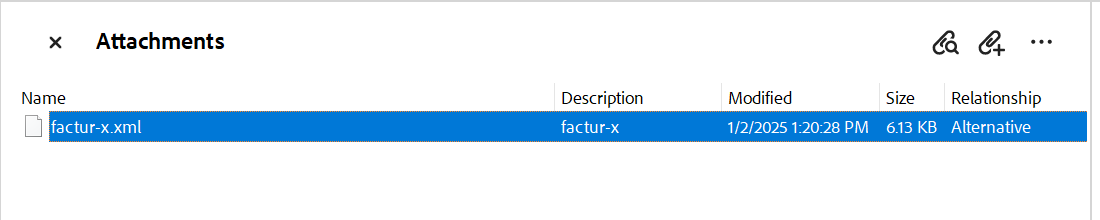
Adobe Acrobat lists the embedded files of a PDF in its Attachments panel. The following panel shows the embedded XML of an electronic invoice, created as in the next section, with its description and relationship:
Create an Electronic Invoice
ZUGFeRD and its French counterpart Factur-X are hybrid invoices: a PDF/A-3 document that people read, with the invoice as XML attached for software to process. Both follow the European standard EN 16931. XRechnung invoices consist of XML only, and since ZUGFeRD 2.1, XRechnung XML can be embedded in a PDF the same way. Since January 1, 2025, domestic B2B invoices in Germany must use such a structured format.
TX Text Control creates the readable invoice and embeds the XML. The XML itself comes from your ERP system or a library such as the open-source ZUGFeRD-csharp. The following program merges the invoice data into a template, embeds factur-x.xml with the XMP metadata that declares the standard and saves a PDF/A-3 document:
using System.Text;
using TXTextControl;
using TXTextControl.DocumentServer;

LoadSettings loadSettings = new LoadSettings()
{
    ApplicationFieldFormat = ApplicationFieldFormat.MSWord,
    LoadSubTextParts = true
};

using (ServerTextControl tx = new ServerTextControl())
{
    tx.Create();

    // PDF/A requires fonts that can be embedded
    tx.FontSettings.EmbeddableFontsOnly = true;

    tx.Load("Documents/template.docx", StreamType.WordprocessingML, loadSettings);

    // The readable invoice
    using (MailMerge mailMerge = new MailMerge { TextComponent = tx })
    {
        mailMerge.MergeJsonData(File.ReadAllText("Documents/data.json"));
    }

    // The XML invoice, created by your ERP system or an e-invoice library
    byte[] invoiceXml = Encoding.UTF8.GetBytes(File.ReadAllText("Documents/factur-x.xml"));

    // rdf:Description elements that declare the invoice standard
    string metadata = File.ReadAllText("Documents/metadata.xml");

    EmbeddedFile invoice = new EmbeddedFile("factur-x.xml", invoiceXml, metadata)
    {
        Description = "factur-x",
        MIMEType = "application/xml",
        Relationship = "Alternative",
        LastModificationDate = DateTime.Now
    };

    SaveSettings saveSettings = new SaveSettings()
    {
        EmbeddedFiles = new EmbeddedFile[] { invoice }
    };

    tx.Save("invoice.pdf", StreamType.AdobePDFA, saveSettings);
}
The code works as follows:
- MailMerge.MergeJsonData fills the template with the invoice data, as Simple Mail Merge describes.
- metadata.xml contains the XMP extension schema of ZUGFeRD with the conformance level, the document type, the version and the name of the embedded file. The blog article Creating ZUGFeRD 2.3 (XRechnung, Factur-X) Documents with .NET C# shows its complete content and creates the XML with ZUGFeRD-csharp.
StreamType.AdobePDFAwrites a PDF/A-3 document, the format hybrid invoices require. PDF/A describes its rules.
Check the result with a validation service for ZUGFeRD and Factur-X. To make later changes to the invoice and its XML detectable, sign the PDF when you save it, as the blog article Why Structured E-Invoices Still Need Tamper Protection using C# and .NET recommends. Signing is described in Digital Signatures.
Extract Attachments From a PDF
To read the attachments of a PDF without working with its content, use the static class Attachments of the TXTextControl.DocumentServer.PDF namespace. The following program writes every attachment of Documents/invoice.pdf to the current folder:
using TXTextControl.DocumentServer.PDF;

EmbeddedFile[] files = Attachments.GetFromFile(Path.GetFullPath("Documents/invoice.pdf"))
    ?? Array.Empty<EmbeddedFile>();

Console.WriteLine($"{files.Length} attachments");

foreach (EmbeddedFile file in files)
{
    Console.WriteLine($"{file.FileName} ({file.MimeType}, {file.Relationship}): {file.Description}");

    // The file name can contain a path
    string fileName = Path.GetFileName(file.FileName);

    if (file.HasBinaryData)
    {
        File.WriteAllBytes(fileName, file.BinaryData);
    }
    else if (file.HasStringData)
    {
        File.WriteAllText(fileName, file.StringData);
    }
}
The code works as follows:
- GetFromFile takes the complete path of a PDF file, and GetFromData takes the PDF as a byte array. Both return an array of DocumentServer.PDF.EmbeddedFile objects.
- This
EmbeddedFileclass is a different class fromTXTextControl.EmbeddedFile, with read-only properties. Its MIME type is named MimeType. - HasBinaryData and HasStringData tell whether the content is in BinaryData or in StringData.
The program uses only the TXTextControl.DocumentServer.PDF namespace, because both namespaces contain a class named EmbeddedFile.
Extract the XML of an Uploaded Invoice
An ASP.NET Core application that receives e-invoices can return their XML directly. The following action reads the attachments of an uploaded PDF and returns the file with the relationship Alternative and an XML MIME type:
using Microsoft.AspNetCore.Mvc;
using TXTextControl.DocumentServer.PDF;
public class InvoiceController : Controller
{
[]
public IActionResult ExtractInvoiceXml(IFormFile document)
{
// Copy the upload into a byte array
byte[] data;
using (MemoryStream memoryStream = new MemoryStream())
{
document.CopyTo(memoryStream);
data = memoryStream.ToArray();
}
EmbeddedFile? invoice = (Attachments.GetFromData(data) ?? Array.Empty<EmbeddedFile>())
.FirstOrDefault(file => file.Relationship == "Alternative" && file.HasBinaryData &&
file.MimeType != null && file.MimeType.EndsWith("xml"));
if (invoice == null)
{
return NotFound("The PDF has no XML invoice.");
}
return File(invoice.BinaryData, invoice.MimeType, Path.GetFileName(invoice.FileName));
}
}
The MIME type is compared by its ending because older invoices use text/xml and newer ones application/xml. How uploads reach a controller is described in Loading Documents.
Keep, Add and Replace Attachments
When ServerTextControl loads a PDF, it stores the attachments in DocumentSettings.EmbeddedFiles, and Save writes them again. A PDF that you load, change and save as PDF therefore keeps its attachments without any code. SaveSettings.EmbeddedFiles replaces them: the array you set is what the saved PDF contains. To add a file and keep the existing ones, pass both:
using TXTextControl;

using (ServerTextControl tx = new ServerTextControl())
{
    tx.Create();

    // PDF/A requires fonts that can be embedded
    tx.FontSettings.EmbeddableFontsOnly = true;

    LoadSettings loadSettings = new LoadSettings();
    tx.Load("Documents/invoice.pdf", StreamType.AdobePDF, loadSettings);

    // The attachments of the loaded PDF, or none
    List<EmbeddedFile> files = new List<EmbeddedFile>(loadSettings.EmbeddedFiles ?? Array.Empty<EmbeddedFile>());

    files.Add(new EmbeddedFile("line-items.csv", File.ReadAllBytes("Documents/line-items.csv"), null)
    {
        Description = "Line items",
        MIMEType = "text/csv",
        Relationship = "Supplement"
    });

    SaveSettings saveSettings = new SaveSettings()
    {
        EmbeddedFiles = files.ToArray()
    };

    tx.Save("invoice-with-line-items.pdf", StreamType.AdobePDFA, saveSettings);

    Console.WriteLine($"{files.Count} attachments saved");
}
A file read from a PDF contains its data as a byte array, and its name, description, MIME type, relationship and dates are kept when it's embedded again. Keep in mind that loading a PDF rebuilds its pages as an editable document, as Load and Modify a PDF explains, so the saved PDF is a new document with the same attachments.
Next Steps
- PDF/A: create archivable PDF/A-3 documents.
- Document Metadata: write and read the title, author and keywords.
- Signing PDF Documents: protect a PDF and its attachments with a signature.
- PDF Validation: check the PDF documents you create.