
Tables of Contents
Longer documents, such as manuals, reports or contracts, get a table of contents built from their headings. In the Document Editor, your code marks headings with structure levels, inserts a table of contents, updates it after the document has changed and removes it.
The examples extend the view of the ASP.NET Core tutorial. Tables of contents were introduced in version 29.0.
How a Table of Contents Is Generated
A table of contents lists the headings of a document. TX Text Control doesn't recognize headings by their look, but by the structure level of their paragraphs:
- Structure level 0 is the default: the paragraph belongs to the body text.
- Structure levels 1 to 10 mark headings, for example 1 for chapters and 2 for sections.
When a table of contents is inserted, the document is searched for all paragraphs within a range of structure levels, and an entry is generated for each of them, with or without page numbers. The entries take over the font and paragraph attributes of the headings. For each level, a formatting style is created, named TOC_Title, TOC_Level1, TOC_Level2 and so on; change these styles to change the look of the table of contents.
A document can contain several tables of contents, for example one for chapters and one for a single part. When headings are added or changed, update the table of contents so that its entries and page numbers match the document again.
Mark Headings With Structure Levels
ParagraphFormat.setStructureLevel sets the structure level of the selected paragraphs. Setting it on every heading works, but it is more common to make the level part of a paragraph style: every paragraph with the style is then an entry of that level. Text and Paragraph Formatting explains styles.
Insert and Update a Table of Contents
TXTextControl.tablesOfContents returns the TableOfContentsCollection of the main text. The following code marks the selected paragraphs as level 1 or 2 headings, inserts a table of contents for both levels at the input position and updates all tables of contents. Add it below the editor in Views/Home/Index.cshtml:
<input type="button" onclick="setHeadingLevel(1)" value="Heading Level 1" />
<input type="button" onclick="setHeadingLevel(2)" value="Heading Level 2" />
<input type="button" onclick="insertTableOfContents()" value="Insert Table of Contents" />
<input type="button" onclick="updateTablesOfContents()" value="Update Tables of Contents" />

<script>
    // 0 is body text, 1 to 10 are heading levels
    function setHeadingLevel(level) {
        TXTextControl.selection.paragraphFormat.setStructureLevel(level);
    }

    function insertTableOfContents() {
        TXTextControl.tablesOfContents.add({
            title: "Contents",
            minimumStructureLevel: 1,
            maximumStructureLevel: 2,
            hasPageNumbers: true,
            hasRightAlignedPageNumbers: true,
            hasLinks: true
        }, function (tableOfContents) {
            if (tableOfContents === null) {
                console.log("No table of contents was added. Are there paragraphs with level 1 or 2?");
            }
        }, function (error) {
            console.log(error.msg);
        });
    }

    function updateTablesOfContents() {
        TXTextControl.tablesOfContents.forEach(function (tableOfContents) {
            tableOfContents.update(function (success) {
                console.log("Updated: " + success);
            });
        });
    }
</script>
The code works as follows:
setHeadingLevelsets the structure level of the selected paragraphs through Selection.paragraphFormat.- TableOfContentsCollection.add inserts a table of contents at the input position. Its first parameter is an object with the settings of TableOfContentsCollectionAddParams; every setting is optional.
- The callback receives the new TableOfContents, or
nullif none could be added, for example because no paragraph has one of the levels. - TableOfContents.update regenerates the entries and the page numbers. Its callback isn't optional.
Select a line, click Heading Level 1, do the same with other lines for level 2, place the cursor at the beginning of the document and click Insert Table of Contents. After you add or change headings, click Update Tables of Contents.
The following document has three headings of level 1 and two of level 2, and the heading "2 Payment Terms" starts on page 2. The table of contents lists them with right-aligned page numbers and dot leaders:
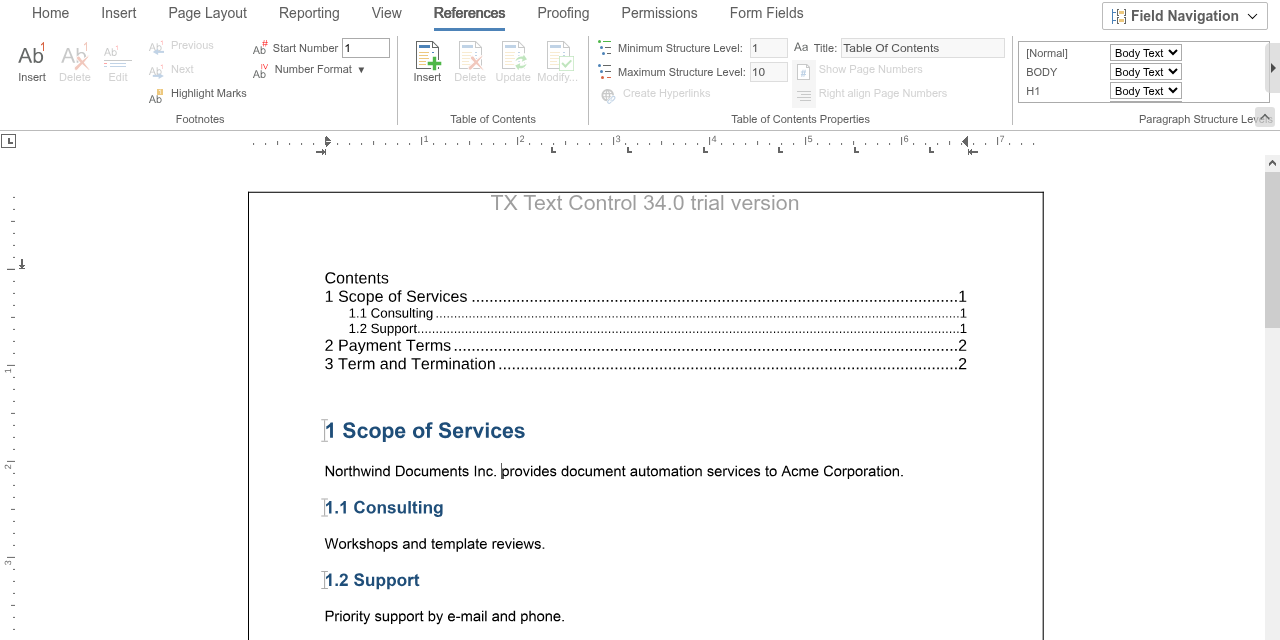
Users work with tables of contents on the References tab: the Table of Contents group inserts, deletes, updates and modifies them, the Table of Contents Properties group sets the levels, the title, the page numbers and the hyperlinks, and Paragraph Structure Levels lists the paragraph styles of the document, each with a drop-down for its structure level.
The Settings of a Table of Contents
| Setting | Effect |
|---|---|
title | A title above the entries; an empty string means no title |
minimumStructureLevel, maximumStructureLevel | The range of structure levels, each from 1 to 10 |
hasPageNumbers | Whether the entries show page numbers |
hasRightAlignedPageNumbers | Whether the page numbers are aligned at the right margin |
hasLinks | Whether each entry is a link to its heading |
An existing table of contents has get and set methods for the same settings, such as setTitle and setMaximumStructureLevel. Call update after changing them.
Instead of your own buttons, you can open the table of contents dialog box of the editor, in which users insert or change a table of contents:
TXTextControl.showDialog(TXTextControl.DialogBoxKind.TableOfContentsDialog);
Links to the Headings
With hasLinks, each entry is a document link, and a document target is created for each heading it points to. The generated links and targets are ordinary document links and targets, with one difference: DocumentTarget.getAutoGenerationType passes TableOfContents from AutoGenerationType instead of None. The documentLinkClicked handler shown on Fields scrolls to the heading of a clicked entry.
Find and Remove Tables of Contents
- getItem passes the table of contents at the input position, or the one with an ID as the third parameter. getItemByName finds one by its name.
- remove removes a table of contents with all its text and all document targets its links point to.
- TableOfContents.scrollTo moves the input position to the beginning of the table of contents and scrolls it into view.
function removeTableOfContents() {
  // Without an ID, getItem passes the table of contents at the input position
  TXTextControl.tablesOfContents.getItem(function (tableOfContents) {
    if (tableOfContents !== null) {
      TXTextControl.tablesOfContents.remove(tableOfContents);
    }
  });
}
React to Table of Contents Events
The editor raises tableOfContentsCreated and tableOfContentsDeleted when a table of contents is inserted or deleted, and tableOfContentsEntered and tableOfContentsLeft when the input position moves into or out of one. The handlers receive TableOfContentsEventArgs, whose tableOfContents contains the number, name, ID, levels and position of the table of contents:
TXTextControl.addEventListener("textControlLoaded", function () {
  TXTextControl.addEventListener("tableOfContentsCreated", function (e) {
    console.log("Table of contents " + e.tableOfContents.number + ": levels " +
      e.tableOfContents.minimumStructureLevel + " to " + e.tableOfContents.maximumStructureLevel);
  });
});
Tables of Contents on the Server
When a template with a table of contents is merged with data by MailMerge on the server, the table of contents needs an update afterward. Update each table of contents with TableOfContents.Update from ServerTextControl.TablesOfContents. The blog article Combining MailMerge and Table of Contents shows the procedure.
Tables of contents are saved and loaded with DOCX, DOC and RTF, and exported PDF documents contain their links. The blog article X19 Sneak Peek: Table of Contents introduces the feature.
Next Steps
- Footnotes: add footnotes to a document.
- Text and Paragraph Formatting: styles and tab leaders for headings and entries.
- Fields: document links and targets.