
Subtext Parts
The clauses of a contract or the text blocks of a template span several words or paragraphs, and subtext parts let your code identify such pieces in the Document Editor. In JavaScript, you add a subtext part, store data with it, read its text, save its content and remove it.
The examples extend the view of the ASP.NET Core tutorial.
What a Subtext Part Is
A document consists of text parts: the main text, the headers and footers and the text frames. A subtext part is a piece of such a text part that your code defines, so that it can find and process this piece later. Each subtext part has:
- a name and an ID, which identify it; both are optional
- data, a string of your own, for example JSON
- a highlight mode and color, so that users can see where it is
Subtext parts follow these rules:
- A subtext part covers at least one character. When its last character is deleted, the subtext part is deleted as well.
- Subtext parts can be nested, but they can't overlap. A nested subtext part must be shorter than the one that contains it, and the outer subtext part must be added first.
- Two subtext parts can follow each other directly. The position between them belongs to the second one.
Merge blocks are subtext parts as well: a merge block is a subtext part whose name starts with txmb_, followed by the block name. Merge Blocks explains how they are used in templates. To make parts of a protected document editable, use editable regions instead, as described in Document Protection.
Add and List Subtext Parts
TXTextControl.subTextParts returns the SubTextPartCollection of the main text; headers, footers and text frames have their own. The following code marks the selected text as a subtext part with data, lists all subtext parts and removes the one at the input position. Add it below the editor in Views/Home/Index.cshtml:
<input type="button" onclick="markSelection()" value="Mark Selection" />
<input type="button" onclick="listSubTextParts()" value="List Subtext Parts" />
<input type="button" onclick="removeSubTextPart()" value="Remove Subtext Part" />

<script>
    TXTextControl.addEventListener("textControlLoaded", function () {
        TXTextControl.addEventListener("subTextPartEntered", function (e) {
            console.log("Entered " + e.name + " (ID " + e.id + ", level " + e.nestedLevel + ")");
        });
    });

    function markSelection() {
        TXTextControl.selection.getStart(function (start) {
            TXTextControl.selection.getLength(function (length) {
                if (length === 0) {
                    console.log("Select some text first.");
                    return;
                }

                // The selection start is zero-based, subtext part positions are one-based
                TXTextControl.subTextParts.add("clause", 1, start + 1, length, function (response) {
                    if (response.addResult !== TXTextControl.AddResult.Successful) {
                        console.log("Subtext part not added: " + response.addResult);
                        return;
                    }

                    var subTextPart = response.subTextPart;
                    subTextPart.setHighlightMode(TXTextControl.HighlightMode.Always, function () {
                        // Store data of your own with the subtext part
                        subTextPart.setData(JSON.stringify({ clauseId: "C-100" }));
                    });
                }, function (error) {
                    console.log(error.msg);
                });
            });
        });
    }

    function listSubTextParts() {
        TXTextControl.subTextParts.forEach(function (subTextPart) {
            subTextPart.getNumber(function (number) {
                subTextPart.getName(function (name) {
                    subTextPart.getText(function (text) {
                        console.log(number + " " + name + ": " + text);
                    });
                });
            });
        });
    }

    function removeSubTextPart() {
        TXTextControl.subTextParts.getItem(function (subTextPart) {
            if (!subTextPart) {
                return; // no subtext part at the input position
            }

            // true: keep the text, true: keep nested subtext parts
            TXTextControl.subTextParts.remove(subTextPart, true, true, function (removed) {
                console.log("Removed: " + removed);
            });
        });
    }
</script>
The code works as follows:
- SubTextPartCollection.add takes a name, an ID, the start position and the length. The name can be
nullor an empty string and the ID can be 0 if you don't need them. The start position is one-based, while Selection.getStart passes a zero-based position, so the code adds 1. - The callback receives SubTextPartCallbackData, whose
subTextPartis the new SubTextPart. ItsaddResultproperty holds a value of AddResult; besidesSuccessful, it can report reasons such asOverlapping. The reference describesaddResultas a second parameter of the callback, but in the Document Editor ofTXTextControl.Web34.5.0 the callback receives only the one object, withaddResultas its property.Combinedmeans that the new subtext part directly follows one with the same name and ID and has been merged into it. - setHighlightMode takes a value of HighlightMode:
Always,NeverorActivatedto highlight the subtext part only while it contains the input position and the editor has the focus. setData stores a string. - forEach calls the function for every subtext part. getNumber passes its number in the order of the text, starting with 1.
- getItem passes the subtext part at the input position. remove takes two Boolean values: whether the text stays in the document, and whether nested subtext parts stay. The second is ignored when the text is removed.
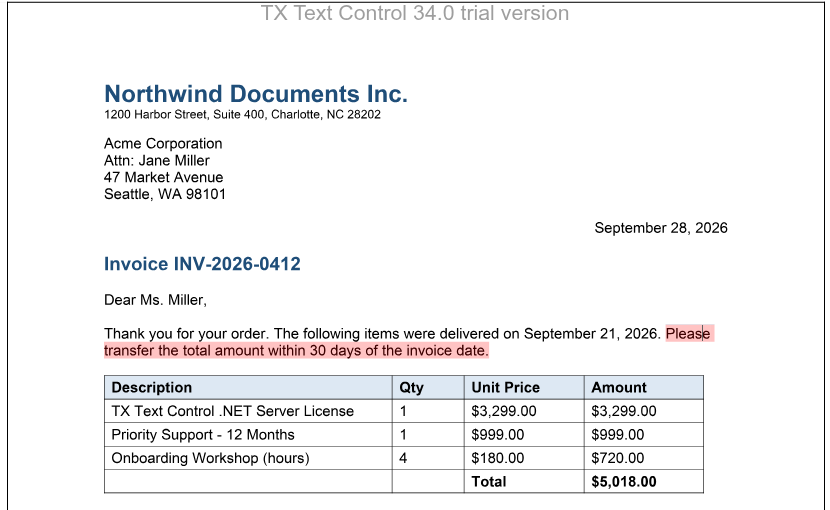
Select a sentence and click Mark Selection: the sentence is highlighted. Click List Subtext Parts to see it in the console, and move the cursor into it to see the subTextPartEntered message.
In the JavaScript API, getItem only finds the subtext part at the input position. To find one by its name or ID, go through the collection with forEach and compare getName or getID. clear removes all subtext parts.
Read the Data and Content of a Subtext Part
The following code logs the data, the number of nested subtext parts and the content as HTML of the subtext part at the input position:
<input type="button" onclick="showSubTextPart()" value="Show Subtext Part" />

<script>
    function showSubTextPart() {
        TXTextControl.subTextParts.getItem(function (subTextPart) {
            if (!subTextPart) {
                console.log("The input position isn't in a subtext part.");
                return;
            }

            subTextPart.getData(function (data) {
                subTextPart.getChildren(function (children) {
                    subTextPart.save(TXTextControl.StreamType.HTMLFormat, function (result) {
                        console.log("Data: " + data);
                        console.log("Nested subtext parts: " + (children ? children.length : 0));
                        // HTML is returned as plain text
                        console.log(result.data);
                    });
                });
            });
        });
    }
</script>
- getData passes the string that
setDatastored. - getChildren passes an array of the nested subtext parts. getNestedLevel passes the level of a subtext part (1 for the top level), and getOuterSubTextPart the subtext part that contains it.
- save saves only the content of the subtext part, in any format of
StreamType. As withsaveDocument,datacontains plain text for HTML and RTF and a base64-encoded string for binary formats.
Other methods of a subtext part pass its text (getText), its position (getStart and getLength; the start is one-based) and the fields it contains (getTextFields, which requires a field type, a callback and an error callback). scrollTo moves the input position to the beginning of the subtext part and scrolls it into view; its callback isn't optional.
Change the Text of Many Subtext Parts
When your code changes the text of several subtext parts, each change moves the positions of the following ones. Calls sent in a forEach loop run at the same time and can insert text at wrong positions. Process one subtext part after the other with async and await, starting with the last one, as described in JavaScript API. The blog article Updating SubTextParts using JavaScript Promises shows this procedure.
React to Subtext Part Events
The editor raises subTextPartCreated and subTextPartDeleted when a subtext part is added or deleted, subTextPartEntered and subTextPartLeft when the input position moves into or out of one, and subTextPartClicked and subTextPartDoubleClicked. The handlers receive SubTextPartEventArgs with the name, ID, number, nesting level, start and length of the subtext part, but not its data. Events lists all events.
Save and Load Subtext Parts
- Subtext parts grow as users type in them. Save documents with subtext parts in the TX Text Control format, which is the format that keeps the data of subtext parts.
- In DOCX documents, bookmarks that span several characters can be loaded as subtext parts with LoadSettings.loadSubTextParts.
- To save a document without its subtext parts, pass
SubTextPartsfrom OmittedContent in SaveSettings.omittedContent. The text and its formatting are kept.
On the server, ServerTextControl.SubTextParts returns the subtext parts of a document that the editor has saved. The blog article The Power of SubTextParts: Typical Use Cases describes applications of subtext parts.
The methods getSubTextParts of TXTextControl and addSubTextPart, getSubTextParts and removeSubTextPart of TextPart are obsolete; use the collection.
Next Steps
- Fields: mark single positions or words instead of longer text.
- Document Protection: make parts of a protected document editable.
- Merge Blocks: repeat parts of a template for each record.